

Most software has always worked the same way: a user does something, and the system responds. Click a button, get a result. Fill a form, get a confirmation. The user drives every step, and the interface waits.
Agentic AI breaks that relationship. Instead of waiting for the next click, a user can hand the system a goal – and the AI interprets it, plans a sequence of steps, makes decisions along the way, takes action, and reports back. The user is no longer initiating every step. They’re delegating a chunk of the workflow.
That shift creates a UX problem most teams haven’t had to solve before. Designers aren’t just laying out screens, buttons, and navigation anymore. They’re designing how AI actions get communicated, when a user needs to approve something before it happens, how much autonomy the system should have, what happens when the AI gets it wrong, and how a user stops, corrects, or recovers from something the AI already did.
The central idea worth holding onto through all of this: good agentic UX isn’t about giving AI maximum autonomy. It’s about finding the right balance between AI autonomy and human control – a balance that shifts depending on the user’s goal, the risk involved, how much uncertainty is in play, and what the consequences of a mistake would be.
Take a simple example. A traditional app might ask a user to manually pull sales data, filter it, compare it to last week, and write a summary – four separate steps, four separate screens. An agentic version can take one instruction – “give me this week’s sales summary” – and handle the rest on its own. That’s a real gain in effort. But it also means the user has less visibility into what happened between the request and the result, which is exactly the gap UX now has to fill.
As AI moves from generating responses to taking actions, UX becomes responsible for trust, control, transparency, permissions, feedback, and recovery – not just layout and flow.
The Problem: Bolting AI Onto an Old Interaction Model

The common approach right now is to add a chatbot, assistant, or “AI feature” onto an existing product without rethinking the interaction model underneath it. That works fine for simple question-and-answer experiences. It breaks down with agentic AI, because agentic systems introduce challenges a chat window was never designed to handle:
- The AI can act without the user initiating every step
- It may make decisions between the initial request and the final outcome
- It may operate across multiple screens, tools, or systems
- It may hit uncertainty or situations nobody anticipated
- Different actions may need different levels of approval
- Users may not know what the AI has already done
- Users may not understand why something happened
- Mistakes can have consequences well beyond a single bad response
Simply displaying a chat window doesn’t create good agentic UX. Products lose user trust fast when people can’t tell what the AI is doing, can’t stop it mid-action, get bombarded with confirmation prompts, or only discover a mistake after it’s already happened. This is the core distinction between AI that assists a user step by step and AI that acts on its own.
The Solution: Design the Relationship, Not Just the Screen

Agentic UX is about designing the relationship between the user, the AI agent, its actions, its decisions, its permissions, and the outcomes it produces. Traditional interfaces mostly care about the moment of interaction. Agentic UX has to account for what happens before, during, and after the AI acts.
That means users need to understand:
- What the AI is trying to accomplish
- What it’s capable of doing
- What it’s already done
- What it plans to do next
- Which actions need their approval
- When they need to step in
- What happened once execution finished
- What can still be undone or corrected
Autonomy shouldn’t be a single, product-wide setting – it should be decided per context. Low-risk, reversible, predictable actions can often run automatically. Sensitive, irreversible, ambiguous, or high-impact actions need explicit approval first.
Effective agentic UX combines user control, appropriate autonomy, transparency, human oversight, clear feedback, error recovery, permission boundaries, and trust. The goal is to reduce user effort without making the user feel like they’ve lost control.
What Agentic AI UX Actually Means
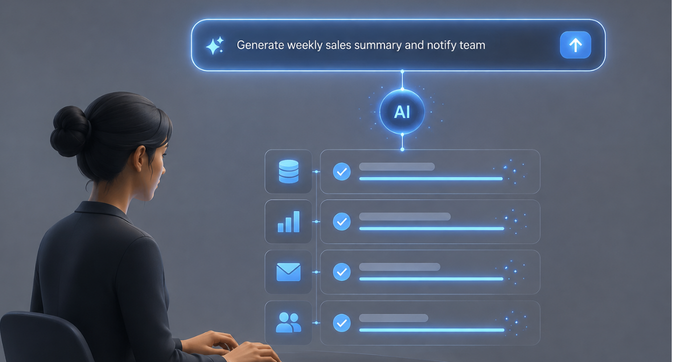
A normal AI interaction generates an output: summarize this, write that, answer this question. An agentic interaction pursues a goal: the AI figures out the intermediate steps required to get there.
Ask a traditional system “create a weekly sales summary” and it produces a summary from what you give it. Ask an agentic system the same thing, and it can gather the relevant data itself, spot what changed, prepare the summary, and deliver it according to whatever instructions it’s been given – no additional prompting required.
Agentic AI UX, then, is the design of interfaces for systems that interpret goals, make decisions, act with some independence, and need to keep a human appropriately informed and in control throughout. It has to account for user intent, AI decision-making, autonomous action, oversight, permissions, feedback, trust, and recovery – because users need to understand and control a system that’s doing things they didn’t individually ask for.
The shift in model looks like this:
Traditional software: User → Action → System Response Agentic AI: User → Goal → AI interprets → AI plans → AI acts → User reviews or intervenes
That second model has more steps, and each one is now a design responsibility.
How Agentic AI Changes the UX Model

Traditional UX follows a predictable loop: the user picks an action, the system processes it, the interface gives feedback, and the user decides what to do next. The user stays in the driver’s seat the whole time.
Agentic UX hands some of that driving to the AI. It can interpret a broad goal, choose between possible paths, execute several actions in sequence, monitor its own progress, adapt to changing conditions, and ask for clarification or approval only when needed. Users stop interacting with every individual step.
That has three consequences for design work:
The space between screens matters as much as the screens. Traditional UX focuses on layouts, components, and flows. Agentic UX also has to account for actions, decisions, states, permissions, approvals, exceptions, recovery paths, notifications, and AI-generated outcomes.
User control has to be real, not just present. When AI can act independently, users need genuine ways to approve, reject, pause, stop, edit, undo, redirect, or take over manually. A visible “stop” button that doesn’t actually stop anything meaningful isn’t control – it’s decoration.
Status becomes a bigger job. A spinner was enough when software only ever did one thing at a time. Agentic systems need to communicate what they’re doing, what’s finished, what they’re waiting on, what’s planned next, and whether the user needs to act – clearly enough that nobody has to guess.
Core UX Principles for Agentic Interfaces

Make AI actions visible. Users should be able to follow the important actions being taken on their behalf – what’s happening now, what’s done, what’s planned, what needs approval, and what the outcome was. This doesn’t mean exposing every internal step; it means surfacing what a user actually needs to stay oriented. “Reviewing customer data → Identifying issue → Preparing response → Waiting for approval” tells a user something. “Processing…” tells them nothing.
Give users meaningful control. Autonomy shouldn’t come at the cost of the ability to intervene – approve, reject, pause, stop, edit, undo, retry, or redirect. The level of control offered should match the stakes: a quick glance at the result is enough for low-risk actions; explicit approval before execution is warranted for anything high-impact.
Design autonomy to fit the task. Not every workflow deserves the same level of independence. A useful way to think about it is a spectrum: Suggest (AI recommends an action) → Preview (AI prepares it for review) → Confirm (user approves before execution) → Execute (AI acts independently) → Monitor (AI keeps going, keeping the user informed). Where a task sits on that spectrum should depend on risk, reversibility, and how confident the system actually is.
Communicate uncertainty through behavior, not numbers. AI isn’t equally reliable across every task, but showing users a raw confidence percentage rarely helps them. It’s more useful to let uncertainty change what the system does: ask a clarifying question, request approval, add context, escalate to a person, or scale back autonomy. The point is to communicate what the uncertainty means for the user’s decision – not to expose a model metric they can’t interpret.
Design for errors and recovery from day one. Autonomous systems can take several actions before anyone notices something went wrong, so recovery needs to be built in, not bolted on later. Cover failed actions, incorrect actions, partial completion, and unexpected outcomes with clear paths to retry, undo, roll back, or bring in a human. At minimum, users should be able to answer: what went wrong, what already happened, what can still be fixed, and what should happen next.
Preserve user intent, especially when instructions are ambiguous. Agentic AI should work toward what the user actually wants, not the most literal or most consequential reading of what they typed. Depending on the stakes, that might mean asking for clarification, presenting options, making a safe low-risk assumption, or falling back to an established preference. This matters most when the action in question is hard to reverse.
Build trust through consistent, transparent behavior. Trust isn’t built by telling users the AI is reliable – it’s built by an interface that consistently shows clear status, a legible action history, understandable explanations, visible boundaries, and real control. Predictability does more for trust than any reassurance copy.
Treat permissions as a UX concern, not just a backend one. AI having the technical ability to take an action doesn’t mean it should be able to by default – especially around financial actions, private information, external communications, account changes, destructive operations, or anything affecting other people. Where those boundaries sit, and how visible they are to the user, is a design decision.
When Should an AI Agent Ask Before Acting?

This is one of the more consequential calls in agentic UX, and the goal isn’t to make the AI ask permission for everything – it’s to tie confirmation to actual risk.
Confirmation matters more when: the action is irreversible, has financial consequences, touches sensitive information, could affect someone else, is based on ambiguous intent, involves high AI uncertainty, could cause reputational harm, or falls outside what the user has already established as acceptable.
Confirmation can often be skipped for: low-risk actions, reversible actions, predictable and repetitive workflows, and anything the user has already authorized or expressed a clear preference about. Asking for approval too often creates confirmation fatigue – users start clicking “approve” without actually reading what they’re approving, which defeats the purpose entirely.
A simple way to frame the decision: risk + consequence + reversibility + uncertainty → the right level of human oversight. That combination determines whether an action should be suggested, previewed, confirmed, executed automatically, or just monitored.
Designing Feedback, Progress, and Action States

A basic loading spinner doesn’t cut it once AI is acting autonomously. Agentic interfaces need a richer set of states to cover the full lifecycle of an action: planning, processing, waiting, asking for approval, executing, completed, partially completed, failed, and needing user input.
At any point in an important workflow, the interface should be able to answer four questions for the user: What’s happening? What has already happened? What happens next? Do I need to do anything?
Useful patterns for this include activity logs, progress indicators, action summaries, approval prompts, notifications, status messages, and completion summaries – though not every workflow needs all of them. How much feedback is warranted depends on the task’s complexity, risk, duration, and how many actions are involved.
This also has implications for design systems. States like “AI working,” “AI waiting,” “AI requesting approval,” “AI partially completed,” “AI needs intervention,” and “AI failed/recovered” are new territory for most component libraries, and products need consistent, reusable patterns for them if AI experiences are going to feel coherent across the product.
Designing for Trust Without Overloading the User

There’s a real tension between transparency and information overload – users need enough visibility to trust the system, but exposing every internal decision makes the interface harder to use, not easier.
Progressive disclosure helps. Lead with the summary a user actually needs – “AI completed 4 actions and found 1 issue requiring your review” – and let them drill into the full action history and reasoning if they want it. This serves both people who just want the headline and people who need the detail.
Explain selectively. Not every decision needs justification. Prioritize explanations for decisions that are unexpected, carry significant consequences, require approval, represent a failure, or are the kind of thing a user might want to override.
Watch for confirmation fatigue. The goal isn’t “the human approves everything” – it’s “the human controls the decisions that actually matter.” Piling on approval prompts undermines the entire point of building an autonomous system in the first place.
Common UX Mistakes in Agentic AI Products

- Too much autonomy, too early. Trust and safety problems follow when users don’t yet understand how the system behaves. Start with lower-risk workflows and expand autonomy as trust builds.
- Asking for confirmation on everything. Constant approval requests make an autonomous workflow feel manual. Use risk-based confirmation instead.
- Hiding what the AI is doing. Invisible actions make a system feel unpredictable, even when it’s working correctly. Show meaningful progress and summaries.
- No undo or recovery path. Autonomous mistakes can compound in ways ordinary UI errors don’t. Build recovery in alongside the autonomous action itself.
- Vague status messages. “Working…” or “Processing…” tells the user nothing useful. Communicate actual states.
- Errors that are hard to understand. Users need to know what failed, what succeeded, and what they can do about it.
- Treating an AI agent like a static UI component. A button behaves the same way every time; an AI agent doesn’t. The UX has to account for variability, uncertainty, autonomy, and recovery – not just a fixed set of states.
How Product Teams Should Approach Agentic UX

Good agentic UX starts with user problems and workflows – not with a decision to “add an AI agent.” A practical sequence:
- Identify where AI is actually useful – pain points, repetitive work, complex decisions, time-consuming workflows, real automation opportunities.
- Map the existing workflow – goals, steps, decisions, dependencies, friction, manual work, exceptions.
- Decide where AI can act – which steps it should suggest, prepare, execute, or monitor.
- Classify actions by risk – consequence, reversibility, sensitivity, ambiguity, user expectations.
- Define human oversight – exactly where a user needs to review, approve, modify, stop, or take over.
- Design feedback and recovery – states, progress, approvals, error handling, retry, undo, escalation.
- Test for trust and usability – do users actually understand what the AI is doing, what it’s already done, when they need to step in, and how to fix mistakes?
- Increase autonomy gradually – based on user feedback, observed behavior, error rates, task risk, and user confidence, not on the assumption that more autonomy is automatically better.
What This Means for AI Product Design

Agentic AI isn’t just a chatbot added to an existing product. Done well, it reshapes product workflows, interaction patterns, information architecture, permissions, notifications, design systems, error handling, and even user roles. It has to be considered at the workflow and product level, not treated as a standalone interface element.
That requires real collaboration across UX, product management, engineering, AI teams, and business stakeholders – because decisions about autonomy depend on technical capability, business risk, user expectations, compliance requirements, and product strategy all at once. It’s also a strategy decision in its own right: where AI creates real value, which workflows are actually suitable for autonomy, which actions should stay human-controlled, and how much AI involvement users are realistically going to accept.
Conclusion
Designing UX for agentic AI is a different job than adding a chatbot to an existing interface. Once AI can act on its own, designers have to think beyond usability and visual design to autonomy, user control, trust, transparency, permissions, feedback, uncertainty, and error recovery.
The best agentic UX doesn’t hand AI as much freedom as it’s technically capable of. It figures out where AI can act independently, where users need visibility, and where human approval is non-negotiable – and it builds that judgment into the product from the start, rather than retrofitting it after something goes wrong.
Getting that balance right – around the user’s actual goals, the risk of each action, the cost of failure, and how much control people need to feel in charge – is exactly where experienced UX and product design work earns its place in bringing agentic AI into real products.
FAQs
What is agentic AI UX?
The design of interfaces and interactions for AI systems that interpret goals, make decisions, perform multiple actions, and operate with varying levels of autonomy – while keeping users appropriately informed and in control.
How is agentic UX different from traditional UX?
Traditional UX centers on user-initiated actions and system responses. Agentic UX also has to design for AI-driven actions, decisions, permissions, progress, uncertainty, approval, and recovery.
How do you design UX for AI agents?
Make actions visible, give users meaningful control, match autonomy to task risk, handle uncertainty through behavior rather than raw metrics, build in error recovery, preserve user intent, stay transparent, and respect permission boundaries.
When should an AI agent ask for confirmation?
Especially for actions that are irreversible, sensitive, financially consequential, ambiguous, high-risk, or that affect other people.
When can an AI agent act without asking?
For low-risk, reversible, predictable, repetitive actions, and workflows where the user has already established clear preferences or permissions.
How do you build trust in agentic AI?
Through visibility, predictable behavior, understandable explanations, meaningful control, appropriately-placed confirmation, clear boundaries, and strong recovery mechanisms.
What happens when an AI agent makes a mistake?
Good UX shows what happened, identifies what was affected, communicates what can be corrected, and offers retry, undo, rollback, escalation, or human intervention as needed.
What UX patterns matter most for autonomous AI?
Action histories, progress indicators, approval prompts, status states, notifications, completion summaries, error states, and recovery controls.
How should design systems adapt to agentic AI?
By adding reusable patterns for AI-specific states – planning, executing, waiting for approval, partially completed, failed, and needing user intervention.
What’s the difference between an AI copilot and an AI autopilot?
A copilot assists and keeps the user actively involved in each step; an autopilot operates with greater independence. Which model fits depends on task risk, user expectations, and how easily a mistake can be reversed.