How to use Claude Design: the quick answer
To use Claude Design, open any Claude conversation, ask for a design (or pick Output > Design in the message box), and refine the result on the canvas that opens beside the chat. It works on every Claude plan, including Free.
- Open Claude on the web, desktop app, mobile app, or in Claude Code.
- Ask for a design in plain words, such as “Design a 4-screen onboarding flow for a fintech app”.
- Add context: screenshots, a brand deck, a Figma file or a GitHub repo.
- Refine it through chat, inline comments on any element, or direct drag-and-resize edits on the canvas.
- Export or hand off to PDF, PPTX or HTML, share a link, or send it to Claude Code to build.
At f1Studioz, we have designed enterprise and SaaS products since 2012, including a design system of 1,000+ components for an energy simulation platform, so this guide looks at Claude Design the way a real product team would use it: on dashboards, onboarding flows and landing pages. It covers where it shines, where it falls short, and how to get production-quality output instead of generic AI screens.
Key takeaways
- Claude Design is Anthropic’s AI design workspace, launched on 17 April 2026 and now built into every Claude chat.
- It is free on all Claude plans; design systems (in beta) need a paid plan.
- Specific prompts get usable designs. Use the f1Studioz BRIEF method: business goal, real user, information, experience, format.
- Its standout feature is the handoff to Claude Code, which builds from your actual design, not a screenshot.
- It speeds up concepts and prototypes, but user research, complex workflows and accessibility still need UX designers.
What is Claude Design, and is it free or paid?
Claude Design is Anthropic’s AI design workspace: you describe what you want, and Claude builds a working design on a canvas next to the chat. Anthropic Labs launched it on 17 April 2026 as a separate site, and it now works inside every Claude conversation.
You can use it to make:
- UI mockups and interactive prototypes
- Wireframes, from low to high fidelity
- Landing pages and website concepts
- Slide decks, one-pagers and social graphics
Is Claude Design free? Yes. According to Anthropic’s product page, Claude Design is included in every plan, including Free. It uses your normal Claude usage limits, and a full design or deck uses more of your limit than a typical message. Paid plans (Pro, Max, Team, Enterprise) add design systems, which are in beta, so every design follows your brand automatically.
| Plan | Claude Design | Design systems |
|---|---|---|
| Free | Yes | No |
| Pro / Max | Yes | Yes (beta, on by default) |
| Team | Yes | Yes (beta, on by default) |
| Enterprise | Yes (on by default from 15 Oct 2026) | Yes (beta, owner turns it on) |
Where to open Claude Design: web, desktop, mobile and Claude Code
You no longer need a separate login or app. Claude Design now lives inside Claude itself, so you can start a design from any of these places (Claude Help Center):
| Where | How to start a design | Best for |
|---|---|---|
| Any chat (web or desktop) | Ask for a design, or choose Output > Design in the message box | Quick mockups, one-pagers, decks |
| Artifacts tab | Pick a Design template | Starting from a ready layout |
| Claude Code (desktop or terminal) | Ask for a design or type /design | Designs that become real code |
| iOS and Android app | Ask in any chat, then view it full screen in the Artifacts tab | Reviewing and light edits on the go |
| claude.ai/design (standalone) | Open the old site | Existing projects only; it closes on 14 December 2026 |
Using the old claude.ai/design site? Move your design systems into Claude before 14 December 2026. Open the Design tab at the bottom of the sidebar and click “Migrate team design systems”. Each design system becomes an artifact you can use in any chat, including Claude Code.
Step by step: create your first design in Claude Design
Your first design can be ready in minutes. Here is the full flow, using a SaaS dashboard as the example.
- Start the design. In a new chat, choose Output > Design, or simply type “Design a…”. The canvas opens beside the conversation.
- Attach your design system (paid plans). If your team has one set up, new projects pick it up automatically. Your colours, fonts and components are already in place.
- Give context. Upload screenshots of your current product, a competitor screen you like, or your brand deck. Context is the single biggest driver of quality.
- Describe the screen. Use the BRIEF method explained below: business goal, real user, information, experience and format. Claude may come back with a few clarifying questions.
- Review the first version. Treat it as a draft, not a final. Check hierarchy, spacing and whether the main action is obvious.
- Refine in three ways.
- Chat for big changes: “Group all the filters into one bar above the table.”
- Inline comments for one element: click a table header and write “Make this column sortable.”
- Direct edits for quick visual shifts: drag, resize and align elements, edit text, or use the sliders Claude creates to tune spacing and colour.
- Ask for options. Asking for “three directions: one minimal, one data-dense, one bold” is the quickest way out of a weak first draft.
- Ask for a review. Claude can explain its design choices, suggest improvements, or check the screen for accessibility.
- Export or share. Share a private link, download as PDF, PPTX or HTML, or hand it off to Claude Code.
Tip from our design team: if an inline comment does not seem to register, paste the same feedback into the chat. Anthropic lists this as a known workaround in its help guide.
How to use Claude Design for UI/UX, websites and landing pages
Claude Design is strongest in the early, messy stage of product work: turning an idea into something a team can react to. Here is how we would use it at each stage of a UX project.
| UX stage | What to ask Claude Design for | What to watch |
|---|---|---|
| Discovery | Quick concept screens to test an idea with stakeholders | Keep it low fidelity so feedback stays on the idea, not colours |
| Wireframing | Low- or high-fidelity wireframes for each key screen | Check the user flow end to end, not screen by screen |
| Prototyping | Clickable prototypes for usability tests | Real content beats lorem ipsum in tests |
| UI design | Polished screens built on your design system | Component consistency across screens |
| Handoff | Code-ready designs sent to Claude Code | Responsive states, empty states and errors |
For websites and landing pages
Give Claude the page’s single job first, then the sections. For example: “A landing page for a B2B HR tool. Goal: book a demo. Sections: hero with one-line value proposition, 3 benefits, customer logos, pricing, FAQ, final CTA.” Then refine section by section with inline comments.
For existing websites, upload screenshots of the current pages and ask for a redesign that keeps your brand. This is a quick way to show a client or leadership team what a refresh could look like before committing budget.
For mobile apps
Ask for the full flow, not one screen: “Map the 5-screen first-order flow for a pharmacy delivery app: location, prescription upload, cart, delivery slot, confirmation.” Seeing screens side by side makes gaps in the journey obvious.
Claude Design prompts that work (with examples)
A strong Claude Design prompt follows the f1Studioz BRIEF method: the five things every design brief needs, whether it goes to a designer or to an AI tool. Vague prompts get generic screens; specific prompts get usable ones.
The BRIEF method for Claude Design prompts
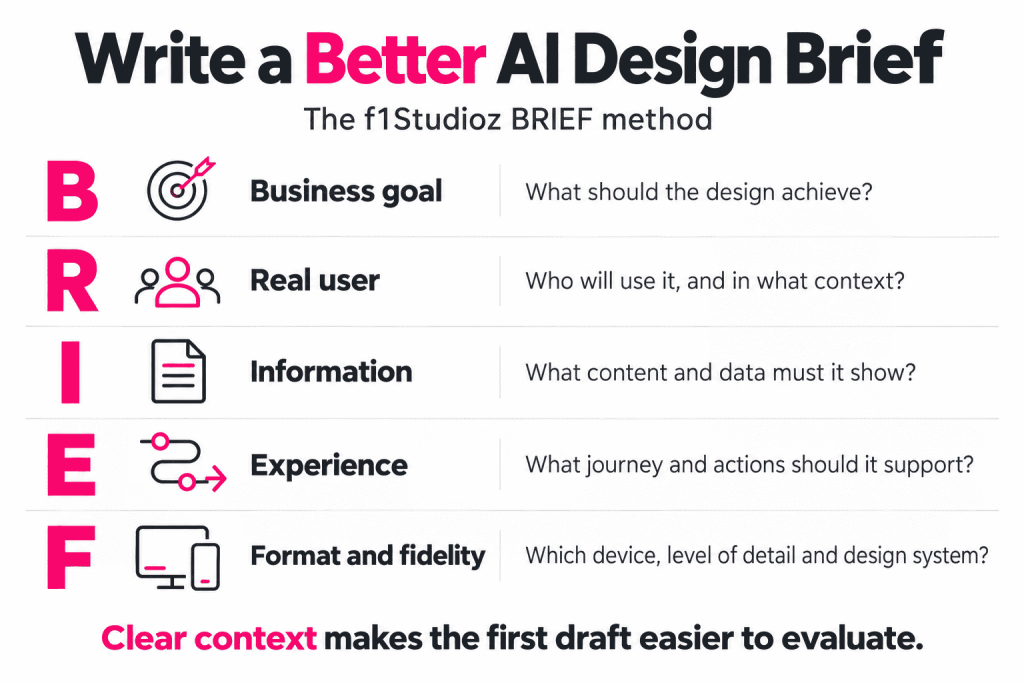
| Letter | Stands for | Example line in a prompt |
|---|---|---|
| B | Business goal | “Goal: cut support tickets about failed payments.” |
| R | Real user | “User: a first-time UPI user, aged 45+, on a budget Android phone.” |
| I | Information | “Show: payment status, why it failed, what to do next, a help link.” |
| E | Experience | “Flow: status screen, then retry, then success. One action per screen.” |
| F | Format and fidelity | “Mobile, high fidelity, our design system, light theme.” |
The “Real user” line is the one most people skip, and it changes the output the most. A screen for a finance head and a screen for a field agent should not look the same.
Weak: “Make a dashboard.”
Strong: “Design a dashboard for a logistics operations manager. Goal: spot delayed shipments fast. Layout: 4 KPI cards on top, a map in the middle, a table of delayed orders below. Content: on-time rate, delayed count, average delay, exceptions today. Desktop, light theme.”
Copy-paste prompts
| Use case | Prompt |
|---|---|
| Agency homepage | “Design a homepage for a UI/UX agency serving enterprises. Goal: book a discovery call. Sections: hero, services, case studies, process, testimonials, CTA. Tone: confident and minimal.” |
| SaaS pricing page | “Design a pricing page for a B2B analytics SaaS with 3 plans. Goal: steer buyers to the middle plan. Users: finance heads comparing vendors. Add a monthly/annual toggle, a feature comparison table and a ‘Talk to sales’ option.” |
| Fintech onboarding | “Design a 3-screen onboarding for a mutual fund app for first-time investors: risk quiz, goal setting, first SIP. One decision per screen, reassuring copy.” |
| Enterprise dashboard | “Design an admin dashboard for HR leaders showing headcount, attrition and the hiring pipeline, with filters for department and location.” |
| Data-heavy table | “Design an orders table for a B2B ops team handling 10,000+ rows: bulk actions, saved filters, inline status edits and a side panel for order details.” |
| Healthcare form | “Design a patient intake form for a clinic that changes its questions based on the reason for the visit, works on a tablet and saves progress.” |
| Pitch deck | “Turn this proposal into a 10-slide pitch deck with one idea per slide and a chart on slide 4.” |
| Redesign | “Here are screenshots of our current pricing page. Redesign it so the recommended plan stands out, keeping our brand colours.” |
Follow-up prompts to refine
- “Give me three directions: one minimal, one data-dense, one bold.”
- “Where should the eye land first? Make that the only primary button.”
- “Check colour contrast against WCAG 2.2 AA and fix anything that fails.”
- “Add empty, loading and error states for this table.”
- “List the assumptions you made about the user so we can test them in research.”
Claude Design systems and skills: make every design on brand
A design system is what turns Claude Design from a generic AI tool into one that designs like your company. It captures your colours, typography, components and layout patterns, and Claude applies them to every new design and deck (Claude Help Center).
Two ways to create one
| Method | How | Works best for |
|---|---|---|
| From a chat | Ask Claude to build a design system from your uploaded files, Figma files, decks, logos and fonts | Brand design systems (fonts, colours, guidelines) |
| From Claude Code | Run /design-sync; it reads your tokens and components directly | Product design systems already built as React components |
You manage them in Settings > Design systems. Claude also checks its own output against your design system and corrects it before you see it. On Team and Enterprise plans, a designer sets it up once and everyone’s work picks it up. Admins can lock a team to one approved system so nobody drifts off brand.
What people mean by “Claude design skills”
Searches for “Claude design skill” usually mean one of two things:
- Skills in Claude: reusable instruction packs that teach Claude a way of working, such as frontend design rules. Developers share many on GitHub, which is why “claude design skill github” is a popular search.
- A DESIGN.md file: a plain-text brief of your colours, type scale, spacing and component rules that AI tools can read. It is a lightweight option if you do not have a full design system yet.
Our view: skills and DESIGN.md files help, but a proper design system built from your real components gives the most consistent results, especially for enterprise products with many screens.
Claude Design to Claude Code: from design to working product
The biggest difference between Claude Design and most AI design tools is the handoff: Claude Code continues from your actual design instead of rebuilding it from a screenshot. Your work stays synced in both directions.
- Sync your design system. In Claude Code, run /design-sync so every new design starts from your existing components.
- Design and iterate in Claude Design until the screens are approved.
- Hand off to Claude Code. Send the finished design across from the canvas.
- Build in your codebase. In Claude Code, use /design to import the design into your project, export your code as a live prototype, or let Claude build the whole thing.
- Ship or share. Claude Design also connects to Vercel, Replit, Lovable and Wix if your team builds there.
Other places you can send your work
- Export: PDF, PowerPoint (PPTX) or HTML
- Import: your codebase, plus DOCX, PPTX and XLSX files
- Connected tools: Adobe, Canva, Gamma, Lovable, Miro, Replit, Vercel and Wix (Anthropic)
Where we still step in: an AI handoff does not replace a front-end review. Check responsive breakpoints, accessibility, edge cases and performance before anything goes live.
Claude Design vs Figma vs Google Stitch
Claude Design is best for going from idea to on-brand design to code in one place; Figma is still the home for detailed, collaborative design work; Google Stitch is a quick, free way to generate UI ideas. Most product teams will use more than one.
| Claude Design | Figma (incl. Figma Make) | Google Stitch | |
|---|---|---|---|
| Made by | Anthropic | Figma | Google Labs |
| How you work | Chat plus an editable canvas | Manual design tools, with AI features added | Prompt-based UI generation |
| Strongest at | Fast first drafts, decks, prototypes, design-to-code | Pixel-level control, team collaboration, mature design systems | Quick UI exploration |
| Brand consistency | Design systems from code, files or brand assets | Libraries and variables, highly mature | Limited |
| Path to code | Direct handoff to Claude Code | Dev Mode and plugins | Code export |
| Best for | Founders, PMs, marketers and designers moving fast | Professional design teams | Early ideation |
Our recommendation: use Claude Design to explore and prototype quickly, and keep Figma for detailed design, design system governance and team reviews. We cover this in depth in our upcoming Claude Design vs Figma comparison.
A UX agency’s take: where Claude Design helps, and where designers still matter
Claude Design makes early design work dramatically faster. The later work, the part that decides whether users actually succeed, still needs UX expertise.
Where it clearly helps
- Getting from a blank page to a reviewable concept in minutes
- Showing stakeholders 3 directions instead of describing one
- Building on-brand decks, one-pagers and marketing assets without a designer in the loop
- Shortening the gap between an approved design and working code
Where it falls short on its own
- User research: it cannot tell you what your users struggle with. It designs what you ask for, not what users need.
- Complex enterprise workflows: multi-role permissions, dense data tables and edge cases need deliberate design decisions.
- Consistency at scale: across 100+ screens, small drifts add up without a design system and a reviewer.
- Accessibility and compliance: AI checks are a start, not a sign-off.
The f1Studioz checklist for reviewing AI-generated designs
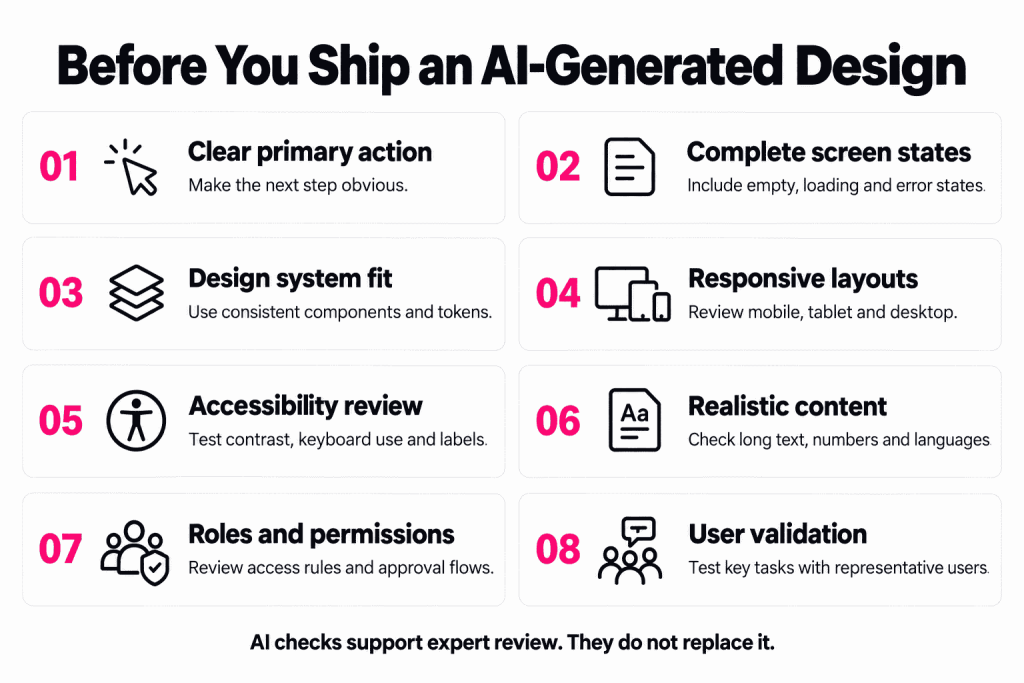
Run every Claude Design output through these eight checks before it goes to stakeholders or developers:
- One primary action per screen. If two buttons compete, users hesitate.
- All states designed. Empty, loading, error and permission-denied states, not just the happy path.
- Design system match. No one-off colours, buttons or spacing values.
- Responsive behaviour. The layout holds at desktop, tablet and mobile widths.
- Accessibility basics. Text contrast meets WCAG 2.2 AA and every control is keyboard reachable.
- Real content. Long names, large numbers, Indian number formats (lakh, crore) and regional languages where relevant.
- Role fit. The flow matches how each user role actually works, including approvals and permissions.
- User validation. At least one real user has seen it before development starts.
How f1Studioz uses AI design tools
Our approach: AI tools like Claude Design speed up exploration, while our UX team owns the research, information architecture, interaction design and design systems that make enterprise products work. The result is speed without generic, look-alike screens.
Planning an AI-powered product or an AI-assisted redesign? Explore our UX design for AI services, or see how we approach UX for accessibility and SaaS UI/UX design. Send us an enquiry for a clear plan on where AI speeds you up and where expert design pays off.
About f1Studioz
f1Studioz is a global UX design company founded in 2012, with a presence in India, the United States and Australia. We design enterprise platforms, SaaS products and design systems, including UI/UX design services in Bangalore and Mumbai. Our work includes an 80% increase in user adoption for a contact centre platform and a 1,000+ component design system for an energy simulation platform.
Claude Design FAQs
Is Claude Design free or paid?
Claude Design is free to use on the Claude Free plan and included in every paid plan. It counts toward your normal usage limits. Design systems need a Pro, Max, Team or Enterprise plan.
Do I need to download Claude Design?
No. It is built into Claude on the web, the desktop app, the iOS and Android apps, and Claude Code. There is no separate download.
How do I log in to Claude Design?
Log in to your normal Claude account and start a design in any chat. The old standalone site at claude.ai/design stays open until 14 December 2026.
Can I use Claude Design on my phone?
Yes. Ask for a design in any chat in the Claude mobile app, then view it full screen in the Artifacts tab. You can make edits on mobile, but sharing settings are changed on web or desktop.
What is the difference between Claude Design and Claude Code?
Claude Design creates visual work: mockups, prototypes and decks. Claude Code writes and edits software. They connect: you design in Claude Design and hand off to Claude Code to build it.
Can I use my Figma files with Claude Design?
Yes. You can upload Figma files, along with decks, logos and fonts, and ask Claude to build a design system from them.
Can Claude Design replace a UX designer?
No. It speeds up drafts and prototypes, but user research, complex workflows, accessibility and design decisions at scale still need experienced UX designers.
What are the best Claude Design alternatives?
The main alternatives are Figma (with Figma Make), Google Stitch, Lovable and Canva. Each suits a different stage, from ideation to production design.
References
- Introducing Claude Design by Anthropic Labs, Anthropic
- Claude Design product page, Anthropic
- Get started with Claude Design, Claude Help Center
- Set up your design system in Claude Design, Claude Help Center