

Imagine a shopper who adds a jacket to their cart, hunts for the coupon field, can’t find it, and then sees a surprise delivery charge on the final step. They close the tab. Nothing is technically broken, yet the product failed them. Usability testing exists to catch exactly these moments. It is a research method in which real users attempt realistic tasks on a product while you observe where they struggle. This guide covers the main methods, the step-by-step process, and practical examples.
What Is Usability Testing?

Usability testing is the practice of watching real people use a website, app, or prototype to complete specific tasks, so you can find out what is easy, what is confusing, and what needs fixing before it costs you users or revenue.
In simple words, usability testing means asking people to try your product and quietly watching what happens. You are not asking whether they like it. You are seeing whether they can use it.
What Is the Main Goal of Usability Testing?
The main goal is to uncover the friction that stops users from achieving what they came to do, and to fix it. It turns assumptions about your design into evidence you can act on.
Simple Example of Usability Testing
A typical session follows a simple pattern:
- Observe real users
- Give them specific tasks, such as “find and buy a pair of running shoes”
- Identify confusion or friction
- Collect feedback
- Improve the experience
Why Is Usability Testing Important?

Design teams know their product too well to see it the way a first-time user does. Usability testing closes that gap. It matters because it:
- Identifies usability problems before they reach a wide audience
- Reduces user frustration by removing unclear steps and dead ends
- Validates design assumptions with real behaviour instead of opinion
- Improves task completion, so more users finish what they start
- Helps reduce development rework, since fixing a design is far cheaper than fixing shipped code
- Supports better conversions and adoption, linking good UX directly to business outcomes
What Does Usability Testing Measure?

Usability testing is more than collecting opinions. It produces measurable indicators of how well a product works.
Task Completion Rate
The percentage of users who successfully finish a task. It is the clearest signal of whether a flow works.
Time on Task
How long users take to complete a task. Unusually long times often point to confusing navigation or unclear labels.
User Errors
The number and type of mistakes users make, such as clicking the wrong element or entering data incorrectly.
Ease of Use
How easy users find the task, often captured through a post-task rating question.
User Satisfaction
How users feel about the overall experience, usually measured with short surveys or standard scales after the session.
What Are the Main Usability Testing Methods?

The right method depends on your goals, timeline, and budget. These are the most common approaches.
Moderated Usability Testing
A researcher guides the session and interacts with the participant. Questions can be asked in the moment, which makes it ideal for understanding the “why” behind behaviour.
Unmoderated Usability Testing
Participants complete tasks on their own, without a researcher present. It is useful for testing with a larger number of people and gathering results quickly.
Remote Usability Testing
Participants test the product from their own location, using their own devices. This widens your participant pool and reflects real-world conditions. It can be moderated or unmoderated.
In-Person Usability Testing
Users and researchers are physically in the same room. This allows you to read body language and observe subtle hesitation that remote sessions can miss.
Guerrilla Usability Testing
You gather quick feedback from readily available participants, such as people in a café or at a co-working space. It is fast and inexpensive, best suited to early-stage ideas.
Comparative Usability Testing
Participants use two or more interfaces, designs, or workflows so you can see which performs better on the same tasks.
Moderated vs Unmoderated Usability Testing
UX teams most often weigh these two methods against each other.
| Moderated Testing | Unmoderated Testing |
| Researcher is present | Researcher is not present |
| Allows follow-up questions | Participants work independently |
| Better for deeper insights | Better for scale |
| Usually takes more coordination | Usually faster to conduct |
Choose moderated testing when you need to understand motivations and probe unexpected behaviour. Choose unmoderated testing when you need broader coverage quickly.
What Is the Usability Testing Process?
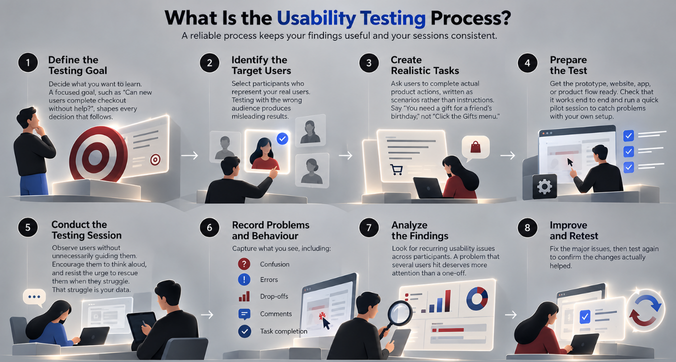
A reliable process keeps your findings useful and your sessions consistent.
Step 1 – Define the Testing Goal
Decide what you want to learn. A focused goal, such as “Can new users complete checkout without help?”, shapes every decision that follows.
Step 2 – Identify the Target Users
Select participants who represent your real users. Testing with the wrong audience produces misleading results.
Step 3 – Create Realistic Tasks
Ask users to complete actual product actions, written as scenarios rather than instructions. Say “You need a gift for a friend’s birthday,” not “Click the Gifts menu.”
Step 4 – Prepare the Test
Get the prototype, website, app, or product flow ready. Check that it works end to end and run a quick pilot session to catch problems with your own setup.
Step 5 – Conduct the Testing Session
Observe users without unnecessarily guiding them. Encourage them to think aloud, and resist the urge to rescue them when they struggle. That struggle is your data.
Step 6 – Record Problems and Behaviour
Capture what you see, including:
- Confusion
- Errors
- Drop-offs
- Comments
- Task completion
Step 7 – Analyze the Findings
Look for recurring usability issues across participants. A problem that several users hit deserves more attention than a one-off.
Step 8 – Improve and Retest
Fix the major issues, then test again to confirm the changes actually helped.
Simple Usability Testing Example

Example: Testing an E-commerce Checkout
Task: Ask users to purchase a product and complete checkout.
Observed problem: Users cannot easily find the coupon field, and some abandon the payment step because delivery charges appear too late.
UX improvement: Show costs earlier, simplify checkout, and make important information clearer.
Retest: Ask another group of users to complete the same task and compare results.
This is the real value of usability testing: it leads to specific design decisions backed by evidence, not just a pile of feedback.
What Products Can Be Usability Tested?
Almost any digital product can benefit, including:
- Websites
- Mobile apps
- SaaS platforms
- Enterprise software
- E-commerce experiences
- Prototypes, even rough, early ones
- AI-powered products, where clarity and trust are especially important
When Should You Conduct Usability Testing?

Many teams assume testing belongs only before launch. In practice, it is valuable throughout the product lifecycle:
- During early concept validation
- After creating wireframes
- During prototype development
- Before product launch
- After launching major features
- When users report recurring problems
- During product redesigns
The earlier you test, the cheaper the fixes.
Common Usability Testing Mistakes to Avoid

- Testing with the wrong users. Participants should match your real audience.
- Asking leading questions. “Was that easy?” nudges people toward a yes.
- Giving users too much help. Hints hide the very problems you need to see.
- Testing unrealistic tasks. Tasks should reflect what users actually do.
- Focusing only on opinions. What people do matters more than what they say.
- Ignoring repeated usability problems. Patterns are your strongest signal.
- Testing once and never retesting. Improvements need validation.
Usability Testing vs User Testing
The two terms are often used interchangeably, but they are not identical.
| Usability Testing | User Testing |
| Evaluates how easily users use a product | Often validates whether users need or understand a product |
| Focuses on usability issues | Can focus on broader product assumptions |
| Usually involves completing tasks | May include interviews, concepts, or feedback |
In short, usability testing asks “Can people use this?” while user testing can also ask “Do people want this?”
How f1Studioz Approaches Usability Testing

At F1 Studioz, usability testing is part of how we design, not a final checkbox. Our approach includes:
- Defining user and business objectives
- Testing real product workflows
- Observing user behaviour
- Identifying friction points
- Prioritizing usability issues
- Iterating designs
- Retesting important journeys
We apply these learnings to enterprise and SaaS products, where complex workflows make clear, usable design especially valuable.
Frequently Asked Questions
What is usability testing in simple words?
It is a method where real users try to complete tasks on a product while researchers observe, in order to find and fix confusing or frustrating parts of the design.
What are the main methods of usability testing?
The main methods are moderated, unmoderated, remote, in-person, guerrilla, and comparative usability testing.
What are the steps in usability testing?
Define the goal, identify target users, create realistic tasks, prepare the test, conduct sessions, record behaviour, analyze findings, then improve and retest.
How many users are needed for usability testing?
For qualitative testing, around five users per round typically reveal most major issues, and running several small rounds works better than one large one. Quantitative or unmoderated studies generally need more participants.
What is an example of usability testing?
Asking shoppers to buy a product on an e-commerce site and noting where they hesitate, make errors, or abandon checkout.
What is the difference between usability testing and user testing?
Usability testing measures how easily people can use a product. User testing can also assess whether people need or understand it.
When should usability testing be conducted?
Throughout the product lifecycle: at concept stage, during wireframes and prototypes, before and after launch, and during redesigns.
What should you measure during usability testing?
Task completion rate, time on task, user errors, ease of use, and user satisfaction.
Final Thoughts
Usability testing is the simple but powerful cycle of testing, learning, improving, and retesting. It replaces guesswork with evidence and helps you build products people can actually use. If you want expert support, explore f1 Studioz’s UX/UI design and UX research services to turn user insight into better products.