
Designing a user interface used to begin with a blank canvas, a set of wireframes and hours of manual work. In 2026, a designer can describe an idea in a prompt and use AI to generate an interface, explore layouts and build an interactive prototype in far less time.
This shift has brought tools such as Claude Design into the same conversation as established platforms like Figma. Both can help teams move from an idea to a visual interface, but they approach the process differently.
For UI/UX designers, product managers, founders and design agencies, the question is no longer simply which tool can create a screen faster. It is about how well each tool supports iteration, reusable components, collaboration and the transition from design to development.
So, how does Claude Design compare with Figma in 2026? And can AI-generated design replace the tools professional teams already rely on?
Can Claude Design replace Figma?
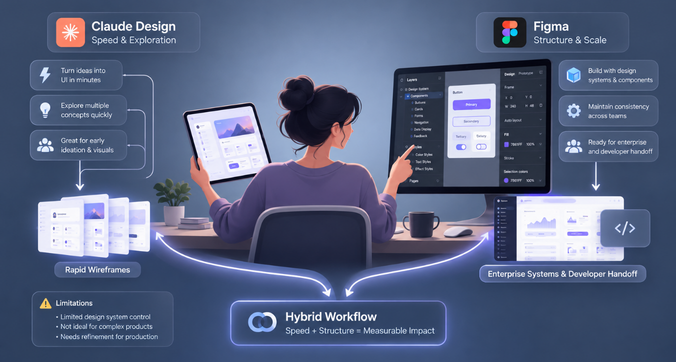
Claude Design can speed up visual exploration, interface generation and interactive prototyping, making it useful for early product concepts and design experiments. Figma offers a broader workflow for collaborative interface design, reusable components, design systems and developer handoff. The right choice depends on the complexity of the product, the team’s workflow and the level of control required.
What is Claude Design, and how does it work?

Claude Design is an AI-powered design experience from Anthropic that lets users create visual work by describing what they want in natural language. It supports designs, interactive prototypes, one-pagers and other visual outputs. Users can refine results through conversation and direct canvas editing.
Instead of constructing every screen element manually, designers can begin with a prompt, review the generated result and ask Claude to make changes. For example, a product designer could request a dashboard with a sidebar, revenue charts, a date filter and a table of recent transactions.
Claude can turn that brief into a starting point, which the designer can then refine. The process makes it easier to explore several visual directions before committing to a detailed design.
Key capabilities of Claude Design in 2026
Claude Design supports several activities that are relevant to product and interface design:
- Prompt-based design generation: Describe a screen, layout or product concept and use AI to create an initial version.
- Conversational refinement: Request changes to layouts, visual elements and content without rebuilding everything from scratch.
- Interactive prototypes: Explore interface concepts through prototypes that can demonstrate user flows and interactions.
- On-canvas editing: Make direct changes to visual elements as part of the refinement process.
- Design-system context: Use established brand colours, typography and component patterns when the relevant design system has been configured.
- Design-to-development workflows: Work alongside Claude Code and other supported workflows to move from a visual concept towards implementation.
These capabilities make Claude Design useful when a team wants to explore multiple ideas quickly or communicate a product concept before investing in a detailed design process.
However, generated output still needs review. A screen can look convincing while containing unclear navigation, inconsistent states or interactions that do not reflect how users actually work.
How AI-generated designs and interactive prototypes work
The process typically starts with a prompt describing the intended users, their goals and the interface requirements.
Consider this brief:
Create a project management dashboard for a team of 20 people. Include task progress, overdue projects, team workload and a filter for project status. Use a clean visual style and make the interface easy to scan.
Claude Design can use this description to generate an initial interface. The designer can then request changes, such as making overdue tasks more prominent, simplifying the navigation or adding a project detail view.
This approach reduces the effort required to explore early concepts. It also makes design experimentation accessible to people who may have limited experience with traditional interface design software.
Interactive prototypes add another layer by allowing teams to explore how a proposed interface behaves. However, prototype functionality should be evaluated separately from visual quality. A working demonstration does not automatically provide the error handling, data validation, security or reliability expected of a production application.
Brand consistency and design-system support
An AI-generated interface is more useful when it reflects an existing product’s visual language. Claude Design can use configured design-system context to guide its output towards established colours, typography and component patterns.
This helps teams maintain a degree of consistency across generated screens. It can also reduce the effort needed to bring an early concept closer to an existing brand.
The important distinction is between using a design system as context and managing a design system as a shared product asset. Teams still need to check whether the correct components, spacing rules, states and interaction patterns have been applied. They also need a reliable way to update and govern those patterns as a product evolves.
Who should use Claude Design?
Claude Design is particularly useful for:
- Founders who want to visualise a product idea before hiring a design team.
- Product managers who need to communicate feature concepts.
- UX designers exploring alternative layouts and user flows.
- Marketing teams creating visual concepts and presentation material.
- Developers who want to test interface ideas before building them.
Professional designers can also use it to reduce the time spent on early exploration. Its value depends on how effectively it fits into the team’s existing design and development process.
What is Figma, and why do UI/UX teams use it?
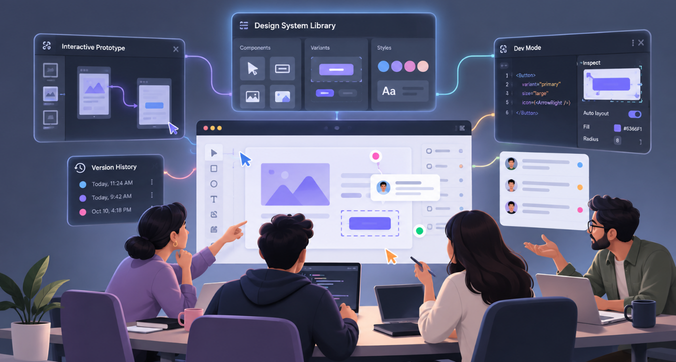
Figma is a collaborative design platform used to create interfaces, prototypes and shared design systems. It allows designers, developers and stakeholders to work from a common source of design information.
Its core strength is the ability to support the wider product design lifecycle. Teams can create individual screens, connect them into user flows, maintain reusable components, gather feedback and prepare designs for implementation.
Figma has also expanded beyond traditional canvas-based design. Its AI features include the Figma agent, Figma Make and tools for generating, editing and refining designs. Figma Make can turn prompts or existing designs into functional prototypes and web apps.
This means the comparison in 2026 is between two tools with AI capabilities, rather than an AI tool and a completely manual design platform.
Collaborative interface design and prototyping
Figma allows multiple team members to work in the same design file, leave comments and review changes together. Designers can share prototypes with product managers, developers and clients without requiring everyone to work directly on the original file.
Its prototyping features connect screens and define interactions such as navigation, overlays and transitions. This helps teams evaluate how an interface works as a journey rather than as a collection of isolated screens.
For example, a designer working on a banking application can map the flow from account overview to transaction history, transfer details and payment confirmation. Stakeholders can review the journey and provide feedback before development begins.
Components, variants, auto layout and design libraries
Figma’s component system allows teams to create reusable interface elements such as buttons, input fields, navigation menus and cards. Variants help manage different states or versions of a component, while auto layout supports flexible spacing and resizing.
Shared libraries make these assets available across files and projects. When a component changes, teams can review and propagate updates through the designs that use it.
These capabilities are especially useful for products with many screens, user roles and recurring interface patterns.
AI can help create or refine design elements, but reusable components and shared libraries provide the structure needed to maintain consistency over time.
Developer handoff through Dev Mode
Figma Dev Mode helps developers inspect designs, view measurements and properties, access assets and work with design-system context. Integrations such as Code Connect and the Figma MCP server can help connect design information with development tools and existing code components.
This does not mean every design can be converted into production-ready code without engineering work. Developers still need to implement application logic, data handling, responsive behaviour, accessibility requirements and error states.
The advantage is that design intent and implementation details can remain connected throughout the development process.
How Figma’s AI tools change the comparison
Figma’s AI features let designers generate and remix designs, automate repetitive work and create functional prototypes from prompts or existing files.
This changes an important assumption in the Claude Design versus Figma debate: designers can already use AI within a collaborative design environment.
A team can use Figma to generate an early direction, refine it on the canvas, apply shared components and prepare it for development. Figma Make can also support more functional prototypes and web apps.
The comparison therefore comes down to the quality of the results, the level of control available and how well each workflow fits the team’s needs.
Claude Design vs Figma: Feature-by-feature comparison
The following table compares the tools across the areas that matter most to product and UX teams.
| Comparison criteria | Claude Design | Figma |
| AI-powered generation | Strong starting point for prompt-led visual creation and conversational refinement | AI generation and editing within a broader design platform |
| UI design | Useful for exploring layouts and interface concepts quickly | Detailed canvas-based control over screens, layers and components |
| Interactive prototypes | Useful for exploring generated concepts and interactions | Established prototyping workflows, alongside AI-powered functional prototypes |
| Design systems | Can use configured brand and component context | Shared libraries, reusable components, variants and variables support ongoing system management |
| Team collaboration | Useful for collaborative AI-led exploration, depending on the workflow | Real-time multiplayer editing, comments, shared files and version history |
| Developer handoff | Supports workflows that connect design exploration with Claude Code and development | Dev Mode, asset inspection, Code Connect and MCP integrations support handoff |
| Enterprise usage | Depends on plan, organisational settings and the maturity of the team’s workflow | Offers organisation-level design systems, access management and enterprise administration |
| Pricing | Depends on the applicable Claude plan and usage limits | Seat-based plans with different features and AI credit allowances |
The key distinction is workflow depth. Claude Design focuses on making visual creation and refinement more accessible through AI. Figma combines AI assistance with a structured environment for maintaining, reviewing and implementing product designs.
Neither tool should be judged by a single generated screen. A fair comparison should examine how easily a team can revise that screen, reuse its components, validate the user experience and hand the result to developers.
Can Claude Design replace Figma for professional UI/UX designers?
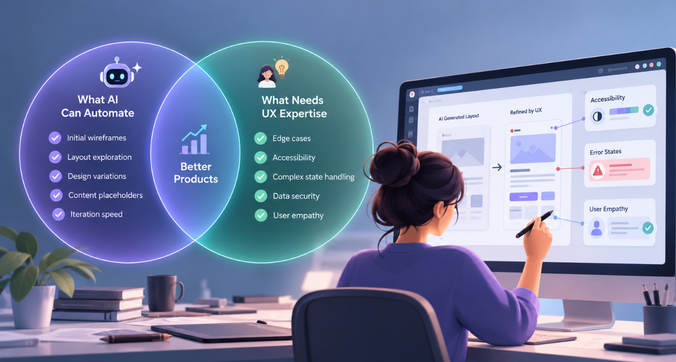
For some tasks, Claude Design can reduce the amount of manual design work required. For an entire product design workflow, the answer depends on the team’s requirements.
Tasks AI can automate or accelerate
Claude Design can help designers move through early-stage work more quickly, including:
- Generating initial interface concepts from a written brief.
- Exploring different layouts and visual directions.
- Producing early prototypes for stakeholder discussions.
- Revising content, hierarchy and visual presentation.
- Creating examples that help teams align on a product idea.
These tasks often involve several rounds of exploration before a team decides what to build. AI can make those rounds faster and allow designers to compare more alternatives.
The designer’s role shifts towards defining the problem, evaluating the options and improving the strongest direction.
Tasks that still require UX expertise
A design tool can generate a screen, but someone still needs to determine whether the screen solves the right problem.
UX expertise is needed to understand user behaviour, prioritise information, map complex journeys, identify accessibility barriers and decide how the interface should respond when something goes wrong.
For example, a generated checkout screen might look polished but fail to explain why a payment was declined. A dashboard might display every available metric without helping users identify which information requires attention.
These are product decisions that require context, research and judgement.
AI can suggest alternatives, but designers need to validate those suggestions against user needs and business requirements.
Limitations in complex enterprise applications
Enterprise products introduce challenges that are difficult to evaluate through visual output alone. A single application may have multiple user roles, permission levels, workflows, data states and dependencies.
A dashboard for an administrator may need controls that are unavailable to a regular employee. A financial application may need to distinguish between pending, completed and failed transactions. An inventory system may need to handle unavailable stock, partial fulfilment and conflicting updates.
Designers must ensure these states behave consistently across the application. They also need to consider responsive layouts, keyboard navigation, accessibility, performance and the practical constraints of the underlying technology.
Claude Design can help generate and explore these interfaces. Figma’s components, variants, libraries and review workflows offer additional structure for managing complex products. The better choice depends on how much of that structure the team needs.
Why usability testing and human judgment still matter
A prototype can help a team understand how an interface might work, but it cannot establish that the design will work well for its intended users.
Usability testing can reveal whether people understand the navigation, notice important information, complete tasks successfully and recover from errors. Accessibility reviews can uncover problems with contrast, focus order, keyboard interaction and screen-reader support.
Designers also need to consider how the interface behaves under real conditions, including slow connections, incomplete information and unexpected user actions.
AI-generated designs should be treated as proposals to evaluate. Their usefulness comes from helping teams reach better design decisions, not from removing the need to make those decisions.
Claude Design vs Figma for SaaS and enterprise UX design

SaaS and enterprise products make the differences between the tools more apparent. Their interfaces often need to support repeated tasks, large datasets, multiple user roles and consistent behaviour across many screens.
Dashboard interfaces and data-heavy systems
A SaaS dashboard may combine charts, tables, filters, status indicators and navigation controls. Its success depends on information hierarchy: users should be able to identify important changes and decide what to do next.
Claude Design can help generate dashboard concepts and explore different ways to organise information. Figma can support more detailed refinement, component reuse and consistency across the wider product.
In either tool, designers need to verify that chart labels are readable, filters behave as expected, tables handle long values and empty states explain what users should do next.
Role-based workflows
Enterprise software often presents different experiences to administrators, managers, analysts and regular users.
A useful design process maps the permissions and tasks associated with each role before generating screens. AI can help visualise these experiences, but the team must verify that every action is appropriate for the relevant user.
Figma’s reusable components and structured design files can help teams maintain consistent patterns across these flows. Claude Design can contribute to early exploration and refinement.
Responsive behaviour and accessibility
Interfaces need to adapt to different screen sizes, input methods and accessibility needs. A desktop layout that works well with a mouse may become difficult to navigate on a smaller screen or with a keyboard.
Designers should evaluate responsive behaviour, text resizing, focus states, colour contrast, keyboard navigation and clear error messages. These checks need to be part of the design process regardless of which tool creates the initial interface.
Design-system governance
Large organisations need shared rules for colours, typography, spacing, components and interaction states. They also need a process for reviewing changes and ensuring that teams use approved patterns.
Claude Design can use a configured design system as context. Figma provides shared libraries and organisation-level features for managing design assets across teams.
For an enterprise team maintaining several products, the question is how easily a design can be traced back to approved components and updated when those components change.
Practical example: Designing a SaaS dashboard using both tools
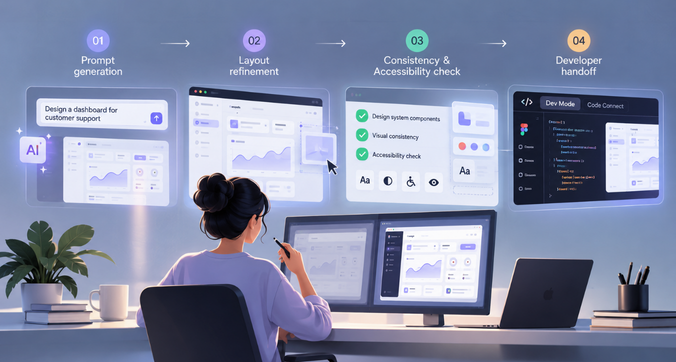
Imagine a team building a SaaS analytics dashboard for business customers. The brief requires a summary of monthly revenue, customer growth, active subscriptions, recent transactions and filters for different reporting periods.
The team wants to compare Claude Design and Figma using the same requirements.
Step 1: Generate the initial interface
In Claude Design, the designer can describe the dashboard, its intended users, the information hierarchy and the preferred visual style. The tool can generate an initial concept that the team can review and refine.
In Figma, the designer can use the Figma agent or Figma Make to explore a similar direction. Existing components and design files can provide context when available.
What to evaluate: How well does each tool interpret the brief? Does the initial layout make the most important information easy to find? Are the labels, filters and data displays appropriate?
Step 2: Refine the layout
The team asks for a clearer distinction between headline metrics and detailed reports. It also wants a date filter, a transaction table and a visible indicator for unusual changes in revenue.
Claude Design can refine the concept through prompts and canvas editing. In Figma, the designer can adjust the layout directly, work with components and use AI features where useful.
What to evaluate: How quickly can the team make changes? Can it preserve the parts that already work while refining specific sections? How much manual correction is needed?
Step 3: Check consistency and accessibility
The dashboard must use the company’s typography, colours and spacing rules. Its charts need clear labels, and its status indicators should communicate meaning beyond colour alone.
The team checks whether the generated interface follows the design system and whether key interactions are accessible.
What to evaluate: Does the tool use the correct visual patterns? Are spacing and typography consistent? Do important states remain clear when the interface is reviewed more closely?
Step 4: Prepare for development
Once the concept is approved, developers need clear component specifications, assets, responsive behaviour and interaction rules.
Figma offers an established workflow through design files, Dev Mode and supported development integrations. Claude Design can support handoff into compatible development workflows, including those involving Claude Code, but the team should confirm how the resulting artefacts fit its implementation process.
What to evaluate: Can developers identify the intended components and states? Are responsive rules documented? Is the handoff clear enough to reduce unnecessary clarification?
What does this comparison tell us?
The exercise should measure more than the time taken to generate the first screen. A useful evaluation includes the number of corrections required, consistency across screens, accessibility findings, component reuse and developer questions during handoff.
The result may differ by project. Claude Design could be particularly effective for exploring early directions, while Figma may be a better fit for teams that need a maintained design system and a structured route to implementation.
The strongest workflow may also combine them, using AI-assisted exploration where it saves time and a shared design environment for refinement and delivery.
Which tool should you choose in 2026?
The best tool depends on the work you do, the people you collaborate with and what needs to happen after a design is approved.
| User or team | Recommended approach | Why |
| Freelancers | Start with the tool that fits the project | Claude Design can speed up concept exploration; Figma offers greater structure for detailed client design work |
| Startups | Consider using both | AI can help validate ideas quickly, while Figma can support reusable components as the product develops |
| Product designers | Use AI for exploration and Figma for structured design work where needed | The combination supports faster iteration and detailed control |
| Design agencies | Choose based on client requirements and delivery processes | Agencies often need review workflows, reusable assets and clear handoff |
| Enterprise UX teams | Prioritise design-system governance and collaboration | Complex products require consistency, permissions, documentation and coordinated development |
What about pricing?
Pricing should be evaluated using the plans available to your team at the time of purchase. Claude Design availability and usage limits depend on the applicable Claude plan and organisational settings. Figma uses different seat types and plan levels, with AI credits included according to the plan.
Figma’s official pricing page lists its plans, seat costs and AI credit allowances. These details can change, so compare the current costs and feature limits before deciding. https://www.figma.com/pricing/
For an individual exploring ideas, a lower-cost entry plan may be enough. For a team, the more useful calculation includes the number of seats, AI usage, collaboration requirements and time spent correcting or transferring generated work.
The cheapest tool is not necessarily the one that produces the lowest overall design cost.
Final verdict: Claude Design or Figma?

Claude Design and Figma serve overlapping but distinct needs in 2026.
Claude Design makes it easier to move from a written idea to a visual concept. It can help designers explore layouts, refine prototypes and communicate ideas without manually constructing every element. This makes it a useful addition to early-stage product design and visual experimentation.
Figma provides a structured environment for detailed interface work, reusable components, collaborative reviews, design-system management and developer handoff. Its growing AI capabilities also mean teams can use prompt-driven generation without leaving the wider product design workflow.
For a designer exploring a new concept, Claude Design may be the faster starting point. For a team maintaining a complex SaaS product, Figma may remain the more suitable primary workspace. Teams that need both rapid exploration and structured delivery can combine the two, provided their workflows and handoff requirements support it.
Ultimately, the goal is to create interfaces that help people complete tasks clearly and reliably. The right tool is the one that helps your team achieve that goal while supporting the level of control, collaboration and consistency your product requires.
Frequently asked questions
Is Claude Design better than Figma for UI/UX design?
Neither tool is universally better. Claude Design is useful for prompt-led visual exploration and rapid concept development. Figma offers a more established environment for detailed interface design, reusable components, collaboration and developer handoff. The choice depends on the project and workflow.
Can Claude Design create interactive prototypes?
Yes. Claude Design supports interactive prototypes that help teams explore and communicate interface concepts. However, prototype capabilities should be assessed against the specific interactions and behaviours a project requires. A prototype should not be assumed to be a production-ready application.
Is Claude Design suitable for professional designers?
Yes. Professional designers can use Claude Design to explore visual directions, generate initial concepts and accelerate iteration. They still need to review the output, validate the user experience and ensure the final design meets accessibility, product and implementation requirements.
Can Claude Design work with an existing design system?
Claude Design can use configured design-system context, including brand colours, typography and component patterns. Teams should still check whether the generated output follows their standards and whether the workflow supports the level of component reuse and governance their product needs.
Does Claude Design replace the need for UX designers?
No. AI can help generate interfaces and accelerate parts of the design process, but UX work also involves research, problem definition, information architecture, usability testing and product decisions. Human expertise remains important for evaluating whether a design works for its intended users.
Which is better for enterprise product design: Claude Design or Figma?
Figma is generally the stronger primary workspace for teams that depend on shared design libraries, detailed component management, collaborative reviews and structured developer handoff. Claude Design can complement that workflow by helping teams explore concepts and generate alternatives. The right choice should be based on the organisation’s design-system, security and delivery requirements.