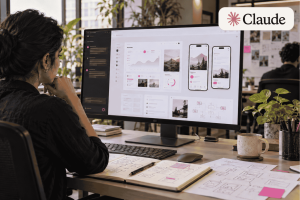
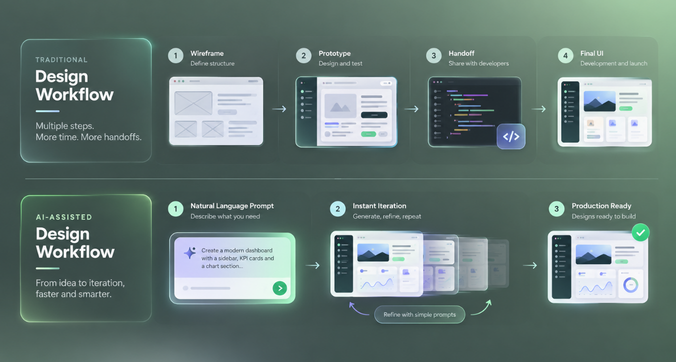
Creating a product interface used to involve several steps before a team could see an idea take shape. Designers would start with wireframes, develop visual layouts, connect screens into prototypes and share them with developers for implementation. Even a small change could mean revisiting several screens.
AI design tools are making parts of this process faster. Teams can describe an interface in natural language, generate an initial layout and refine it through prompts instead of starting every screen from scratch. Product managers can explore ideas before writing detailed requirements, while designers can test different layouts without spending hours building each variation.
Three tools worth comparing in 2026 are Claude Design, Figma Make and Google Stitch. All three use AI to help people create interfaces, but they approach the work differently.
Claude Design focuses on visual creation, design-system-aware iteration and moving work into other tools. Figma Make generates functional prototypes and web apps within the Figma ecosystem. Google Stitch offers an AI-native canvas for exploring interfaces, connecting screens and carrying design rules across tools.
Which is better: Claude Design, Figma Make, or Google Stitch?
The answer depends on your workflow. Claude Design is worth considering for teams that want to explore visual concepts and work with existing brand or product systems. Figma Make is a strong option for teams already using Figma that need interactive prototypes. Google Stitch is useful for exploring interface ideas quickly and experimenting with different directions before committing to a design.
For product teams, the real question is how well each tool fits into the journey from an early idea to a tested, consistent and implementable interface.
What is Claude Design?
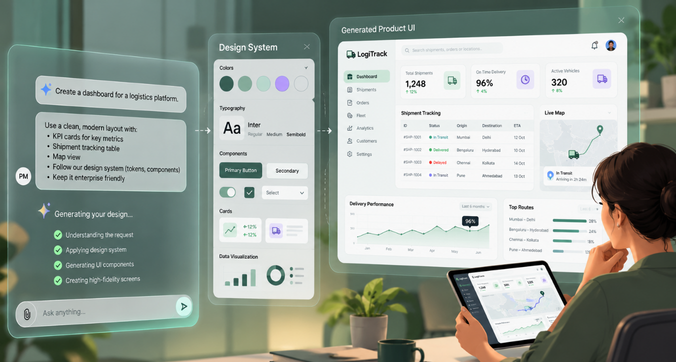
Claude Design is Anthropic’s AI-assisted visual creation tool. It helps users turn written descriptions, existing files and design references into visual work, including product mockups, interface concepts and interactive prototypes.
Instead of relying entirely on a blank canvas, users can describe what they want, review the first version and refine individual elements through conversation or direct editing. It is designed to make visual exploration accessible to people across product, design and business teams.
AI-assisted visual design and prototypes
Claude Design can turn a rough product idea into a visual concept that teams can discuss. A product manager, for example, could describe a new onboarding flow and ask for screens covering account creation, profile setup and the first successful action.
The team can then review the flow, adjust the content and explore alternative layouts. This makes it easier to discuss an idea before investing in detailed design work or development.
Interactive prototypes also help teams communicate how a feature should behave, rather than relying on static screenshots alone.
Editing, collaboration and design-system integration
Claude Design supports direct edits, comments and prompt-based refinements. Teams can also bring in design systems from design files, code repositories or uploaded references to guide the generated output.
Its connection with Claude Code provides another route from design exploration to implementation. This is useful when designers and developers want to work with existing components rather than recreate an interface independently.
For larger teams, design-system controls can help keep work aligned with approved visual rules.
Strengths and limitations for product teams
Claude Design is useful when teams need to explore several visual directions, create mockups or prepare prototypes for discussion. Its support for existing design systems and connections to other tools also makes it relevant to teams with established workflows.
However, a visually convincing prototype still needs review. Product teams must check interactions, accessibility, responsive layouts and edge cases before treating a concept as ready for development. The quality of the output also depends on the context and references provided.
Claude Design can speed up the first stages of design, but it does not remove the need for product thinking and validation.
What is Figma Make?
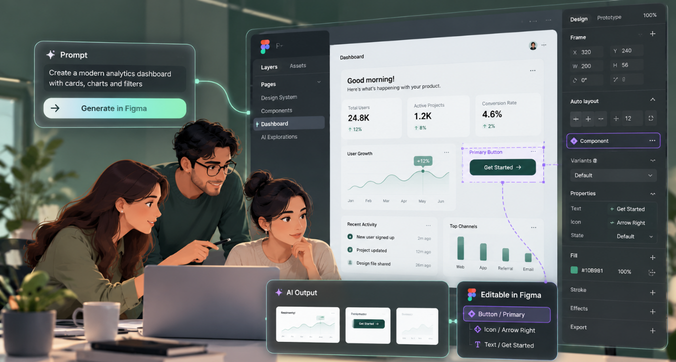
Figma Make is Figma’s prompt-driven tool for creating functional prototypes and web applications. Users can describe what they want to build, attach existing designs or components, and refine the generated result through further instructions.
Its main advantage is its connection to Figma Design. Teams can bring their existing design work into the generation process and move between AI-generated prototypes and editable design layers.
Prompt-to-app and interactive prototyping
Figma Make is suited to ideas that need more than a static visual.
For example, a team designing a subscription management dashboard could ask it to generate a screen with plan details, usage metrics, billing history and an option to change subscriptions. The team could then refine the layout and add interactions to demonstrate how the experience should work.
Figma Make also supports publishing functional prototypes as websites, making it easier to share an early version with stakeholders.
Some prototypes can incorporate backend support through integrations such as Supabase. However, this does not automatically make the resulting application production-ready.
Using existing Figma libraries and design systems
For teams already working in Figma, the ability to use existing designs and library styling context is a major advantage.
Rather than describing every colour, font and component in each prompt, designers can provide existing references. Figma Make can use these to guide the generated interface.
Teams can also package design-system context into reusable Make kits, helping maintain consistency across projects.
The important distinction is that having access to a design library does not guarantee that every generated component will follow it perfectly. Designers should review component usage, spacing, typography and responsive behaviour before moving forward.
How Figma Make connects design and development
Figma Make supports a workflow in which designers explore an idea, product managers review the experience and developers inspect or reuse the resulting work.
Generated previews can be copied into Figma Design as editable design layers. Teams can also share prototypes and use Figma’s wider collaboration and developer-handoff features.
This makes ‘Figma Make’ particularly useful for organisations that already rely on Figma for design reviews, shared libraries and communication between design and engineering.
Its main consideration is AI credit usage. Complex requests and repeated iterations can consume more credits, so teams should account for usage limits when planning regular work.
What is Google Stitch?
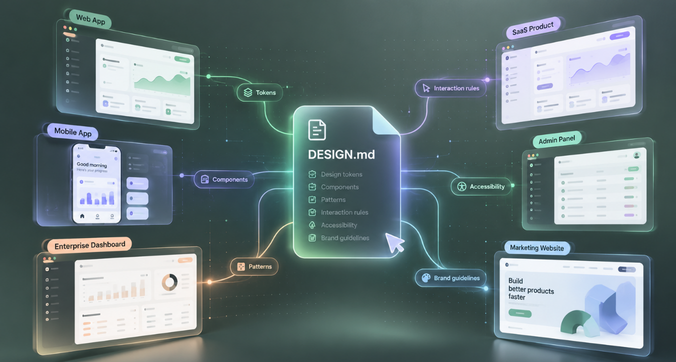
Google Stitch, developed by Google Labs, is an AI-powered interface design tool that helps users turn natural-language descriptions and visual references into UI designs.
In March 2026, Google introduced an AI-native canvas designed for exploring ideas, generating high-fidelity interfaces and iterating across a project. Subsequent updates added real-time collaboration with the Stitch Agent and additional ways to move work towards implementation.
Stitch is especially relevant to teams that want to explore several interface directions before settling on one.
AI-native UI design and vibe design
Stitch supports what Google calls vibe design: describing the purpose, feel and goals of an interface instead of specifying every visual detail upfront.
For example, a team could ask for an analytics dashboard that helps sales managers identify declining revenue, compare regional performance and investigate missed targets. The prompt can describe the intended audience and priorities, giving the tool a clearer starting point than a list of generic UI components.
This approach is useful during early exploration, when the team may still be deciding what the product should look like.
Natural-language interface generation
Stitch can generate interfaces from written prompts and use visual references or code as additional context.
Teams can explore different layouts, adjust individual screens and create connected interactions. Its canvas also supports multiple ideas in parallel, helping designers compare approaches without treating the first generated result as the final answer.
This can shorten the time needed to prepare concepts for an internal review or an early product discussion.
DESIGN.md and portable design systems
One of Stitch’s notable developments is DESIGN.md, a format for documenting and sharing design rules across tools.
A DESIGN.md file can describe elements such as colours, typography, component conventions and the intended use of visual styles. Teams can import or export these rules rather than reconstructing their design guidance for every new project.
Google open-sourced the draft specification in April 2026, with the aim of making it usable across different platforms and design or coding tools.
For teams experimenting with multiple AI tools, this portability can be valuable. A shared set of design rules gives different tools a clearer reference for generating consistent interfaces.
However, a portable design-system file is only as useful as the rules it contains and how well each tool applies them. Teams still need to validate the output.
Prototyping, iteration and developer export
Stitch supports interactive prototypes, letting teams connect screens and preview user journeys. Its newer workflow also allows users to steer changes as the design develops.
For handoff, Google has introduced ways to share designs through Google AI Studio and move work into Google Antigravity or publish it through Netlify.
These options make Stitch useful for teams that want to move from an initial concept towards a working demonstration. The exact amount of additional engineering required will depend on the interface, integrations and product requirements.
Claude Design vs Figma Make vs Google Stitch: detailed comparison
The three tools overlap in interface generation and prototyping, but their workflows differ.
| Feature | Claude Design | Figma Make | Google Stitch |
| AI interface generation | Visual concepts, mockups and prototypes | Functional prototypes and web apps | High-fidelity UI concepts and prototypes |
| Prompt-based iteration | Conversation, direct edits and comments | Prompt-driven refinement and plan mode | Natural-language iteration with the Stitch Agent |
| High-fidelity design | Supports visual refinement and design-system context | Can use existing Figma designs and styling | Designed for visual exploration and refinement |
| Interactive prototyping | Supports shareable interactive prototypes | Supports functional prototypes and web apps | Supports connected screens and interactive previews |
| Design-system support | Imports existing systems from files, repositories and code | Uses Figma designs, library styling and Make kits | Supports design rules through DESIGN.md |
| Responsive behaviour | Requires validation across screen sizes | Requires validation across screen sizes | Requires validation across screen sizes |
| Developer handoff | Claude Code and supported external tools | Figma Design layers and developer workflows | Google AI Studio, Antigravity and Netlify workflows |
| Collaboration | Sharing, comments and team controls | Figma’s established collaboration environment | Shared canvas and real-time agent-assisted iteration |
| Pricing | Available through Claude plans; usage limits apply | Figma plan and AI credit limits apply | Check current Stitch access and usage terms |
The key difference is the environment each tool makes easier to work in. Claude Design centres on visual creation and refinement, Figma Make builds on an existing design platform, and Stitch focuses on AI-assisted exploration and design portability.
No single tool wins every category. The best fit depends on what your team already uses and what it needs to produce next.
Which AI design tool produces better UI designs?
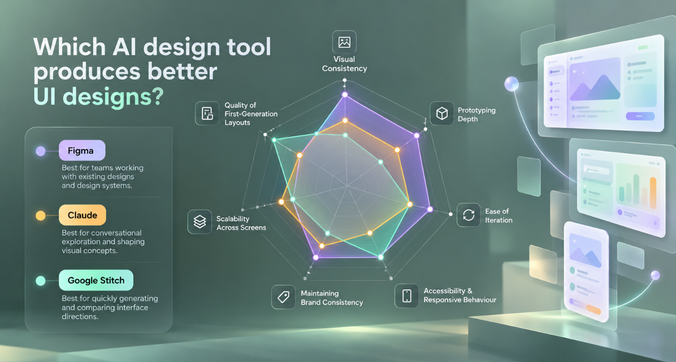
A good AI-generated interface needs to do more than look attractive in a screenshot. It should make information easy to understand, help users complete tasks and remain consistent as the product grows.
Quality of first-generation layouts
All three tools can produce useful starting points from a well-written prompt. The difference is how teams approach the first result.
Claude Design works well when a team wants to shape a visual concept through conversation and direct editing. Figma Make is useful when the starting point includes existing Figma designs or components. Stitch is suited to generating and comparing interface directions on an AI-native canvas.
The quality of the first result depends on the prompt, available references and complexity of the interface. A prompt that describes the user’s goals, important information and expected actions will usually provide better direction than one that simply asks for a modern dashboard.
Visual consistency across multiple screens
A single attractive screen is relatively easy to assess. A product with 15 related screens is a different challenge.
A dashboard, settings page and account management flow should share the same typography, spacing, button styles and interaction patterns. Claude Design can use imported design systems, Figma Make can draw on existing Figma libraries, and Stitch can apply documented design rules through DESIGN.md.
Teams should test whether these rules remain consistent across different screens and subsequent edits. If every prompt produces a slightly different visual style, the team may spend more time correcting the output than expected.
Accessibility and responsive behaviour
AI-generated interfaces need accessibility and responsive design checks, regardless of which tool creates them.
A useful evaluation should cover colour contrast, keyboard navigation, visible focus states, readable text, form labels and clear error messages. Teams should also check how layouts behave on smaller screens, including whether tables, navigation menus and complex filters remain usable.
Design-system guidance can help establish accessible defaults, but it does not replace testing. A layout that looks correct on a desktop may still be difficult to use on a phone or with assistive technology.
Maintaining brand consistency
Brand consistency involves more than using the correct logo and colours. It includes typography, content style, spacing, component behaviour and the way information is presented.
Claude Design, Figma Make and Stitch all offer ways to provide design context. The most useful option will depend on where the team’s approved design rules live and how easily those rules can be reused.
Before choosing a tool, test it against several screens from your actual product. This will reveal more than a single landing-page experiment.
Which tool is best for SaaS dashboard and enterprise UX design?
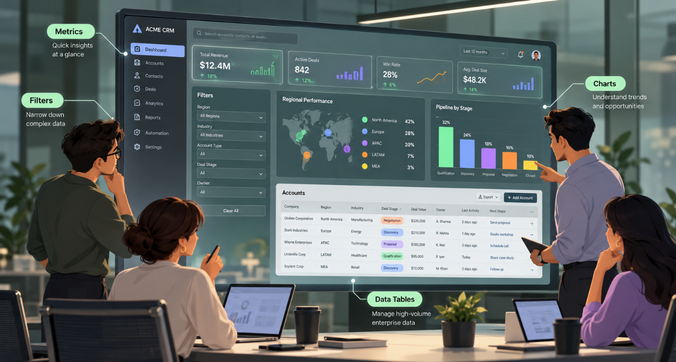
SaaS products often have more demanding interface requirements than simple marketing pages. A CRM might contain hundreds of records, an ERP system may have several interconnected workflows, and an analytics dashboard needs to make complex information easy to interpret.
For these products, interface generation is only the beginning. Teams also need predictable component behaviour, clear information hierarchy, reusable patterns and a reliable handoff to development.
Consider three common examples.
– CRM interface: A sales team needs a pipeline view, account details, filters, activity history and a way to update deal stages. Figma Make is a practical choice when these screens must connect to an existing Figma library and become an interactive prototype. Claude Design can help explore different layouts and simplify dense screens. Stitch can quickly generate alternative pipeline views and test different ways of presenting information.
– ERP interface: An operations team needs inventory tables, approval workflows, permissions and forms with several dependencies. Here, consistency and behaviour matter more than visual novelty. Figma Make may suit teams already using Figma libraries, while Claude Design can help explore workflows using existing components. Stitch is useful for early exploration, particularly when the team wants to compare different approaches before committing to a design system.
– Analytics dashboard: A product team wants to display revenue trends, conversion rates and regional performance. Stitch can help explore visual directions quickly. Claude Design can help refine the presentation and align it with existing brand rules. Figma Make is useful when stakeholders need an interactive prototype that fits into the team’s established design workflow.
For enterprise UX, the recommendation is to choose the tool that works best with your existing system and validation process. None of these tools automatically guarantees production-ready accessibility, reliable business logic or compliance with internal design standards.
Practical test: Build the same SaaS dashboard with all three tools
A fair comparison needs more than three screenshots selected after the fact. Teams should give each tool the same brief, use the same acceptance criteria and document how much work is needed to reach an acceptable result.
The following is a proposed evaluation method, not a report of a test already performed.
The test brief
Ask all three tools to create a desktop-first SaaS analytics dashboard for a subscription business. The dashboard should include monthly recurring revenue, churn rate, customer growth, a revenue trend chart, a date filter, a regional breakdown and a table of at-risk accounts.
Use the same prompt:
Create an analytics dashboard for a B2B SaaS company. Include monthly recurring revenue, churn rate, customer growth, a revenue trend chart, a date-range filter, a regional performance breakdown and a table of at-risk customer accounts. Use clear information hierarchy, accessible colour contrast, consistent components and a responsive layout. Include empty, loading and error states. Make the main interactions usable in a clickable prototype. Use realistic sample data and keep the interface suitable for a professional enterprise product.
If a team already has a design system, provide the same approved references to each tool wherever supported. If it does not, ask each tool to establish a basic visual system and document the differences in the setup.
Acceptance criteria
Each output should be assessed against the same requirements:
- All requested dashboard elements are present.
- The most important metrics are easy to identify.
- Charts, filters and account tables are readable.
- Core interactions work as expected in the prototype.
- The layout adapts to a smaller screen.
- Loading, empty and error states are represented.
- Colours, typography and components remain consistent.
- The output can be shared and handed off through the team’s intended workflow.
Evaluation rubric
Score each category from 1 to 5, where 1 means poor and 5 means excellent.
| Evaluation category | Weight |
| Visual hierarchy and clarity | 20% |
| Functional interactions | 20% |
| Design-system consistency | 15% |
| Responsive behaviour | 15% |
| Accessibility checks | 10% |
| Ease of iteration | 10% |
| Developer handoff | 10% |
| Total | 100% |
Calculate the weighted score by multiplying each category’s rating by its weight and adding the results. Record the time taken, the number of prompts used and any manual corrections required.
Run the test on a documented date, using the same model settings where the tools allow it, and give each tool the same number of refinement rounds. Three rounds is a reasonable starting point.
The results should be published only after the test has been conducted. Include screenshots of the same dashboard sections, the completed scores and notes about any limitations encountered.
This matters because a tool that generates an impressive first screen may require substantial work to make the entire experience consistent and usable. The strongest result is the one that meets the acceptance criteria with the least correction, not necessarily the one that looks best at first glance.
Claude Design vs Figma Make vs Google Stitch: pricing and team requirements
Pricing matters, but the advertised subscription price does not tell the whole story. Teams should consider AI usage limits, collaboration features, access controls and the cost of the tools they already use.
- Claude Design: Claude Design is available through Claude plans, including the Free plan according to Anthropic’s current product information. Usage limits apply, and larger design tasks can consume more of a user’s allowance. Teams should check their plan’s current limits and whether administrators need to enable access.
- Figma Make: Figma Make is included within Figma’s plan structure and uses AI credits shared across Figma’s AI features. The Starter plan offers limited access, while paid plans provide larger monthly credit allocations. Complex prototypes, additional context and repeated iterations can increase credit consumption. Teams should check the current Figma pricing page before budgeting.
- Google Stitch: Check the current Stitch interface and official Google Labs documentation for the latest access conditions, usage limits and any applicable pricing. Access to a tool does not necessarily mean every feature or level of usage will remain unrestricted.
For a fair comparison, teams should assess the total cost of running their workflow, rather than comparing subscriptions alone. Include existing design software, AI credit consumption, collaboration needs and the time spent correcting generated work.
Which tool should startups, designers and enterprises choose?
The best choice changes with team size, existing processes and the stage of the product.
| Team or use case | Recommended starting point | Why |
| Startup exploring a new product | Google Stitch | Useful for quickly exploring different UI directions |
| Designer working in an established Figma workflow | Figma Make | Connects AI generation with existing Figma designs |
| Product manager validating an idea | Claude Design | Helps turn a rough concept into a visual prototype |
| SaaS team with shared Figma libraries | Figma Make | Supports a workflow built around existing design assets |
| Team experimenting with portable design rules | Google Stitch | DESIGN.md supports sharing design guidance across tools |
| Team refining brand-led visual concepts | Claude Design | Supports imported design systems and direct visual editing |
| Enterprise with strict design governance | Evaluate all three against internal requirements | Access controls, consistency and handoff need practical validation |
These are starting recommendations, not fixed rankings. An enterprise team already invested in Figma may find Make the most practical option, while another organisation may prefer Claude Design or Stitch for early exploration.
Before committing, run a small pilot using real product screens. Check whether the tool fits your existing workflow, how much manual correction it needs and whether the team can maintain consistent results over time.
Final verdict: Best AI design tool by use case
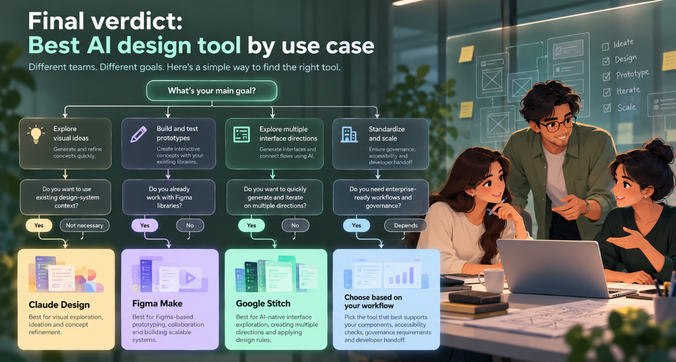
There is no universal winner in the Claude Design vs Figma Make vs Google Stitch comparison. Each tool addresses a different part of the design process.
- Best for visual exploration: Claude Design is a strong option when teams want to shape concepts, refine layouts and use existing design-system context.
- Best for Figma-based prototyping: Figma Make is a natural starting point for teams that already work with Figma libraries and need functional prototypes.
- Best for AI-native interface exploration: Google Stitch is useful when teams want to generate multiple directions, connect screens and carry design rules across tools.
- Best for enterprise product workflows: Choose based on how well the tool supports your existing components, accessibility checks, governance requirements and developer handoff.
AI can help teams move from an idea to a working concept much faster. The harder work is making sure that concept solves the right problem, works for different users and remains consistent as the product grows.
That is where experienced product designers and UX teams continue to make a difference.
Frequently asked questions
Is Google Stitch better than Figma Make?
Google Stitch is useful for rapid interface exploration and portable design-system workflows. Figma Make is a strong fit for teams that already use Figma and want prompt-generated prototypes connected to their existing design assets. The better option depends on your workflow and the result you need.
Can Claude Design generate production-ready interfaces?
Claude Design can create visual concepts and interactive prototypes, but these should be treated as starting points. Production work still needs engineering review, responsive testing, accessibility checks, security validation and verification of business logic.
Is Google Stitch free to use?
Check Google’s current Stitch interface and official documentation for the latest access and usage terms. Availability and usage limits can change, so verify the conditions before planning a team-wide rollout.
Does Figma Make support existing design systems?
Yes. Figma Make can use existing Figma designs, components and library styling context. Teams can also package design-system information into reusable Make kits. Generated output should still be reviewed for consistency.
Which AI design tool works best for SaaS applications?
Figma Make is a practical starting point for SaaS teams already using Figma libraries. Claude Design and Google Stitch are also useful for exploring dashboard layouts, workflows and alternative interface concepts. Test all relevant options against your actual product requirements before deciding.
Can AI design tools replace professional UI/UX designers?
AI tools can speed up repetitive work, generate early concepts and make prototyping more accessible. They cannot independently guarantee that a product meets user needs, handles complex workflows or provides an accessible and coherent experience. Designers still need to research user problems, make trade-offs, validate decisions and guide implementation.
AI can generate screens. Need a scalable product experience?
Generating an interface is one part of product design. Building an experience that works across users, devices and complex workflows takes a deeper understanding of user needs, business goals and design systems.
At F1 Studioz, we help businesses turn product ideas into clear, usable digital experiences through research, UX strategy, interface design and product development support.
Need help turning AI-generated concepts into a scalable product experience? Talk to f1studioz.