UI/UX design in 2026 is no longer limited to creating screens and prototypes. Modern product teams need tools that support interface design, research, prototyping, design systems, collaboration, developer handoff and increasingly AI-assisted workflows.
The challenge is that there is no single tool that is best for every stage of the UX process.
Figma remains the strongest all-round UI/UX design platform for most teams, while tools such as ProtoPie are better suited to advanced interactive prototypes, Maze focuses on UX research and usability testing, Penpot provides an open-source alternative, and Axure RP is useful for complex enterprise prototypes.
At F1 Studioz, we have worked with product and engineering teams for more than 13 years across enterprise software, SaaS, telecom, banking, energy and digital commerce. Based on those workflows, this guide compares the UI/UX tools that are genuinely useful in modern product design teams.
Best UI/UX Design Tools at a Glance
| Requirement | Recommended Tool | Best For |
|---|---|---|
| Best UI/UX tool overall | Figma | Product and UX teams |
| Best free UI/UX tool | Figma / Penpot | Beginners and smaller teams |
| Best open-source design tool | Penpot | Open-source and developer-friendly teams |
| Best Mac UI design tool | Sketch | Mac-based designers |
| Best advanced prototyping tool | ProtoPie | High-fidelity interactions |
| Best enterprise prototyping tool | Axure RP | Complex workflows and enterprise UX |
| Best UX research tool | Maze | Prototype testing and user research |
| Best behavioural analytics tool | Microsoft Clarity | Heatmaps and session recordings |
| Best whiteboarding tool | Miro | Workshops and product strategy |
| Best Figma whiteboard | FigJam | Teams already using Figma |
| Best website design tool | Framer | Websites and landing pages |
| Best no-code production tool | Webflow | Complex CMS websites |
What is the best UI/UX design tool in 2026?
For most product teams, Figma is the best overall UI/UX design tool in 2026 because it combines interface design, prototyping, collaboration, design systems and developer handoff within one ecosystem. However, specialized teams may prefer ProtoPie for advanced prototyping, Maze for research, Axure for complex enterprise workflows or Penpot for open-source design.
1. Figma – Best Overall UI/UX Design Tool
Figma remains one of the strongest platforms for modern product design teams because it brings design, prototyping, collaboration, design systems and developer workflows into the same environment.
Its browser-based architecture makes cross-platform collaboration simple, while features such as reusable components, variables, shared libraries, Dev Mode and AI capabilities make it suitable for both smaller product teams and large organizations.
Figma currently offers a free Starter plan, while its Professional full seat is listed at $16 per month. Figma
Best for
- Product design teams
- SaaS companies
- Enterprise UX teams
- Design systems
- Remote collaboration
- Designer-developer workflows
Key strengths
- Real-time collaboration
- Components and design systems
- Advanced prototyping
- Developer handoff
- Large plugin ecosystem
- AI-assisted workflows
Limitation
Teams requiring extremely complex conditional prototypes or hardware-connected interactions may still benefit from specialized tools such as Axure or ProtoPie.
F1 Studioz view
For most product teams, Figma should be the starting point rather than the entire UX stack. Research, behavioral analytics and advanced prototyping often require additional specialist tools..
2. Sketch – Best UI Design Tool for Mac Users
Sketch remains a strong choice for designers who prefer a native Mac environment.
It supports interface design, prototyping, collaboration, reusable components and developer handoff. Its biggest limitation remains its dependence on macOS for the primary design application.
Sketch’s current Standard plan is listed at $12 per editor/month when billed annually, while a Mac-only license is available separately. Sketch
Best for
- Mac-only design teams
- Native desktop workflows
- Designers who prefer local files
- Established Sketch environments
Choose Sketch if
Your entire design team works on Macs and you prefer a native application rather than a browser-first environment.
3. Penpot – Best Open-Source UI/UX Design Tool

Penpot deserves much stronger visibility in this article.
It provides an open-source design and prototyping environment designed around web standards.
This makes it particularly relevant for teams that value:
- Open-source software
- Self-hosted environments
- Designer-developer collaboration
- Greater infrastructure control
Best for
Development-heavy teams, open-source organizations and teams looking for an alternative to proprietary UI design platforms.
Figma vs Penpot
Use Figma when ecosystem maturity, plugins and collaboration depth are priorities.
Consider Penpot when open-source infrastructure and control are more important.
4. Axure RP – Best for Complex Enterprise Prototypes
Axure should absolutely be on this page.
It is especially useful for UX designers working on:
- Enterprise software
- Complex dashboards
- Conditional workflows
- Logic-heavy prototypes
- Internal business applications
Axure RP 11 currently lists the Pro plan at $29/user/month and the Team plan at $49/user/month. Axure
Best for
Enterprise UX teams that need prototypes to behave more like functional applications rather than basic clickable mockups.
Why use Axure instead of Figma?
Figma is easier for everyday UI design and collaboration.
Axure becomes useful when the prototype needs:
- Conditional logic
- Variables
- Complex interactions
- Detailed business flows
6. Adobe XD – Should You Still Learn It in 2026?
This section needs a substantial update.
Your current article presents Adobe XD almost like an active Figma competitor. Pasted text
I would reposition it.
Is Adobe XD still worth learning in 2026?
Adobe XD may still be relevant for teams maintaining existing XD projects, but it should not be the default recommendation for designers choosing a new UI/UX platform in 2026.
For new workflows, Figma, Sketch, Penpot, Axure and ProtoPie provide stronger long-term options depending on the use case.
This is far safer than presenting XD as one of the top three modern platforms.
UX Research & Testing Tools
A strong UI is not evidence that the experience works.
UX teams need research tools to understand:
- Where users struggle
- What users understand
- Whether critical tasks can be completed
- Where users abandon journeys
- Whether prototype assumptions hold up
7. Maze – Best for UX Testing
Maze helps UX teams validate prototypes and product experiences using structured usability tests.
It is particularly useful for:
- Prototype testing
- Navigation testing
- Task completion analysis
- User feedback
- Research studies
Best for
Product teams that want measurable usability data before or after launching interfaces.
8. Microsoft Clarity – Best Free Behaviour Analytics Tool
Microsoft Clarity is particularly useful for studying real behaviour after users interact with a website or application.
It includes:
- Session recordings
- Click heatmaps
- Scroll heatmaps
- Rage-click insights
- AI summaries
Microsoft currently states that Clarity is free with no traffic limits. Microsoft Clarity
Best for
Teams wanting to understand what users actually do after a product or website goes live.
Expert note
Heatmaps shouldn’t replace proper user research.
They tell you what users are doing, but interviews and usability testing are usually better for understanding why they are doing it.
That sentence adds genuine UX expertise instead of generic tool descriptions.
Best AI Tools for UI/UX Designers in 2026
This section needs much more depth than the existing article.
The current page mostly discusses Uizard/Galileo, ChatGPT and image utilities. Pasted text
Instead, organize AI by workflow.
AI for Interface Ideation
Tools such as Uizard and AI-powered design environments can help designers turn prompts or rough ideas into early interface directions.
Best used for:
- Early ideation
- Low-fidelity concepts
- Exploring layouts
- Breaking blank-canvas paralysis
AI-generated interfaces should still be reviewed against usability, accessibility, brand requirements and actual user needs.
AI for UX Writing
AI assistants can accelerate:
- Button labels
- Empty states
- Error messages
- Tooltips
- Product descriptions
- Onboarding copy
The biggest mistake is using AI copy without reviewing context.
A technically correct sentence can still be wrong for the user’s journey.
AI for Research Synthesis
AI is increasingly useful for helping UX teams organize:
- Interview transcripts
- Survey responses
- Usability observations
- Behavioral patterns
- Research themes
But research synthesis should remain human-reviewed, particularly when product decisions depend on interpreting user intent.
This is another good GEO/E-E-A-T sentence.
Accessibility Tools
Stark
Stark helps designers evaluate accessibility directly within their design workflow, including color contrast and visual accessibility checks.
Best for
Teams that want to identify accessibility issues before development.
Contrast
Contrast-checking utilities help designers evaluate whether foreground and background colors meet accessibility requirements.
Important
Accessibility should not be treated as a final checklist.
It should influence:
- Typography
- Navigation
- Interaction states
- Color systems
- Forms
- Keyboard behaviour
- Content hierarchy
No-Code Website and Product-Building Tools
Framer vs Webflow
Choose Framer when:
- You want fast website publishing
- Designers own most of the workflow
- The project is a portfolio, landing page or marketing site
- Visual speed matters
Choose Webflow when:
- You need a more complex CMS
- You need deeper production control
- The website contains large content structures
- Marketing teams need scalable page management
Direct Answer
Is Framer better than Webflow?
Neither is universally better. Framer is generally easier for design-led teams building modern marketing sites quickly, while Webflow provides greater flexibility for complex CMS-driven websites and production workflows.
Developer Handoff Tools
Modern UI/UX design does not end when the mockup is approved.
Developers need:
- Component specifications
- Spacing values
- Typography
- Design tokens
- Assets
- Interaction behaviour
- Responsive rules
Figma Dev Mode
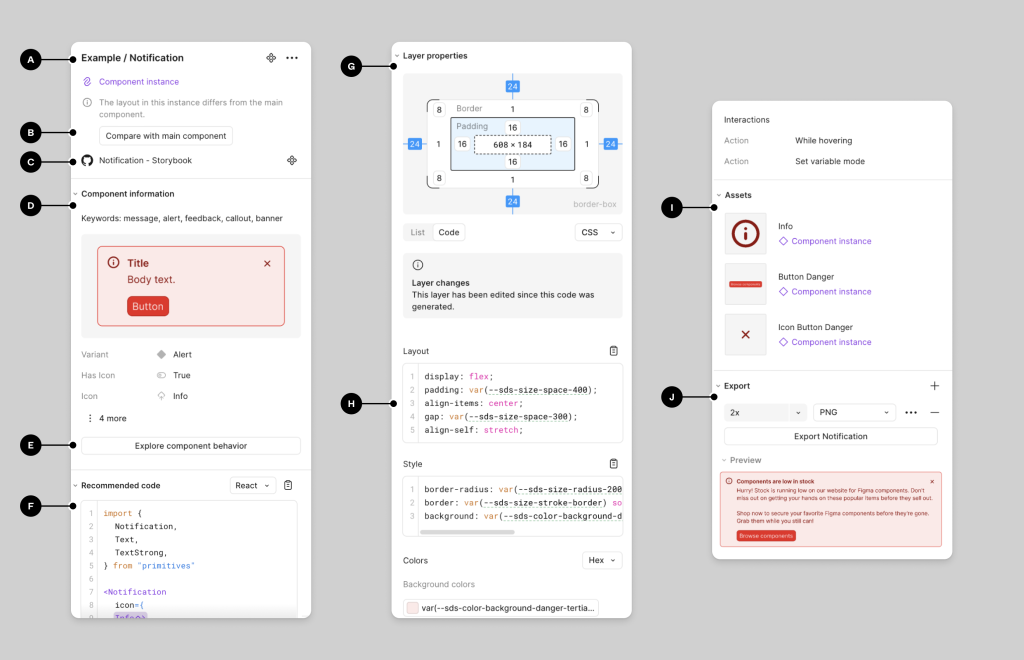
Figma Dev Mode connects design specifications more directly with engineering workflows.
For organizations working with large product teams, good handoff is less about “exporting CSS” and more about maintaining a shared design system and common language between designers and developers.
That is the kind of sentence that makes the article sound like it was written by people who actually work on products.
Whiteboarding & Product Strategy
Miro
Best suited to:
- Journey mapping
- Discovery workshops
- Sprint planning
- Brainstorming
- Service blueprints
- Research synthesis
FigJam
FigJam works particularly well for teams already operating inside the Figma ecosystem.
Miro vs FigJam
Choose FigJam for lightweight collaboration tightly connected to Figma.
Choose Miro when workshops, strategy, research synthesis and large collaborative boards form a bigger part of your process.
Best UI/UX Tools by Use Case
| If you need… | Choose |
|---|---|
| General UI/UX design | Figma |
| Mac-native interface design | Sketch |
| Open-source UI design | Penpot |
| Complex enterprise prototypes | Axure RP |
| Advanced interactive prototypes | ProtoPie |
| UX testing | Maze |
| Session recordings and heatmaps | Microsoft Clarity |
| Workshops and strategy | Miro |
| Figma-based whiteboarding | FigJam |
| Fast marketing websites | Framer |
| Complex no-code websites | Webflow |
How to Choose the Right UI/UX Tool
Do not choose a design tool simply because it is popular. Evaluate it against the workflow your team actually has.
1. What are you designing?
A marketing website, enterprise dashboard, mobile app and automotive interface can require very different prototyping capabilities.
2. How complex are the interactions?
Basic clickable journeys can be handled within Figma. More sophisticated behavioural prototypes may justify ProtoPie or Axure.
3. How large is the design team?
Larger organizations need stronger:
- Design systems
- Permissions
- Governance
- Shared libraries
- Security
- Developer workflows
4. How closely do designers and developers work?
If design and engineering collaborate continuously, developer handoff and design-token support become more important.
5. What type of research do you conduct?
Design software doesn’t replace UX research.You may still need dedicated tools for usability testing, analytics or behavioural observation.
Why Trust F1 Studioz’s UI/UX Tool Recommendations?
F1 Studioz has been designing digital product experiences since 2012, bringing more than 13 years of experience across enterprise UX, SaaS platforms, digital commerce and complex product ecosystems.
Our design teams have collaborated with product and engineering teams across global organizations, including Siemens Energy, Deutsche Telekom, The Home Depot, NASDAQ, Tata Tele Business Services and Emirates NBD.
These projects span areas such as digital-grid transformation, commerce experiences, enterprise sustainability platforms, B2B application marketplaces and banking interfaces.
The tool recommendations in this guide reflect the practical realities of product design — collaboration, research, prototyping, design systems and developer handoff — rather than simply comparing feature lists.
What Product Leaders Say About Working With F1 Studioz
F1 Studioz has worked closely with founders, product leaders, engineering teams, and enterprise stakeholders across complex digital products and platforms.
Our clients often highlight our ability to understand complex business requirements, collaborate effectively with internal teams, and translate product challenges into usable digital experiences.
These experiences also shape how we evaluate UI/UX tools. We look beyond feature lists and consider how tools perform in real product workflows, including collaboration, prototyping, design systems, research, and developer handoff.
Experience Behind Our Recommendations
The recommendations in this guide are informed by more than 13 years of working on digital products across enterprise software, SaaS, banking, telecom, energy, commerce, and other complex product environments.
F1 Studioz has collaborated with product and engineering teams across organizations including Siemens Energy, Deutsche Telekom, The Home Depot, NASDAQ, Tata Tele Business Services, and Emirates NBD.
How We Evaluated the UI/UX Tools in This Guide
Choosing the right UI/UX tool is not simply about picking the platform with the longest feature list. A tool needs to fit the way designers, researchers, product managers, and developers actually work together.
For this guide, we evaluated UI/UX tools across the factors that have the greatest impact on professional product-design workflows.
Evaluation Factor What We Considered UI Design Capabilities Components, layouts, responsive design, reusable patterns, and visual-design workflows Prototyping Depth Support for basic flows, animations, interactions, variables, and complex prototype logic Collaboration Real-time editing, feedback, comments, stakeholder reviews, and distributed-team workflows Design Systems Shared libraries, reusable components, variables, tokens, and governance capabilities Developer Handoff Design specifications, assets, measurements, code references, and engineering collaboration UX Research Support Usability testing, user feedback, behavioral insights, and research integration Enterprise Readiness Permissions, scalability, security, team management, and support for larger organizations Learning Curve How quickly new designers and teams can become productive with the platform Value for Money Whether the available features justify the cost for individuals, startups, and enterprise teams Our Evaluation Approach
Our recommendations are based on how these tools support real-world product-design activities rather than popularity alone.
At F1 Studioz, more than 13 years of experience working with product and engineering teams has shown us that the best tool is rarely the one with the most features. It is the one that fits the team’s workflow, product complexity, collaboration model, and design maturity.
Pricing, product features, and availability can change over time, so teams should also verify current plans and capabilities on each tool’s official website before making a long-term decision.
Free vs Paid UI/UX Tools: Which Should You Choose?
You do not need an expensive design stack to start learning UI/UX design.
Many professional tools provide free plans that are more than sufficient for students, junior designers, freelancers, and small teams. Paid plans become more useful when collaboration, research, design systems, security, or enterprise workflows begin to scale.
Best Free UI/UX Tool Stack
A practical free or low-cost starting stack can look like this:
Requirement Tool UI and Product Design Figma or Penpot Whiteboarding FigJam User Surveys Google Forms Behaviour Analytics Microsoft Clarity Portfolio Behance or a personal portfolio website For someone learning UI/UX design, this stack covers most of the fundamentals: interface creation, collaboration, research, behavioral analysis, and portfolio presentation.
When Should You Pay for UI/UX Tools?
A paid plan starts making sense when free tools begin restricting the way your team works.
Consider upgrading when you need:
- Larger or shared design-system libraries
- Advanced team permissions
- Enterprise security and administration
- More sophisticated prototypes
- Larger usability research studies
- Higher participant or project limits
- Better version control
- Advanced developer handoff
- Organization-wide design governance
Free vs Paid: Our Recommendation
Start with free tools and upgrade based on an actual workflow limitation.
A paid tool is not automatically a better tool.
For most designers, mastering a focused set of tools and understanding UX research, interaction design, accessibility, and product thinking will create far more value than paying for several platforms they rarely use.
Which UI/UX Tool Should I Learn?
The best UI/UX tool to learn depends on the type of work you want to do.
If You’re a Beginner → Start With Figma
Figma is a strong starting point because it introduces you to the core workflows used in modern UI/UX design, including:
- Interface design
- Auto layout
- Components
- Design systems
- Prototyping
- Collaboration
- Developer handoff
It also makes it easier to build portfolio projects while learning industry-standard product-design workflows.
If You Want to Work in Enterprise UX → Learn Figma + Axure
Enterprise products often contain:
- Complex dashboards
- Multiple user roles
- Long workflows
- Conditional states
- Business rules
- Data-heavy interfaces
Figma works well for interface design and design systems, while Axure can be useful when prototypes require deeper logic and conditional interactions.
If You Want to Specialize in Interaction Design → Learn Figma + ProtoPie
Figma is suitable for most everyday prototypes.
ProtoPie becomes valuable when you need to communicate advanced:
- Micro-interactions
- Gestures
- Motion
- Transitions
- Dynamic interface behavior
This combination is particularly useful for interaction-heavy products and high-fidelity prototype demonstrations.
If You Want to Move Into UX Research → Learn Figma + Maze + Microsoft Clarity
UX research goes beyond creating screens.
Figma helps you build prototypes, Maze can support usability testing, and Microsoft Clarity can help you understand how users behave on live digital experiences.
Together, they expose you to both design and validation.
If You Prefer Open-Source Tools → Consider Penpot
Penpot is worth exploring if your team values open-source software, web standards, or greater control over its design infrastructure.
Quick Recommendation
Career Goal Recommended Tools UI/UX beginner Figma Product designer Figma + FigJam Enterprise UX designer Figma + Axure Interaction designer Figma + ProtoPie UX researcher Figma + Maze + Clarity Open-source workflow Penpot The goal should not be to learn as many tools as possible.
Master one primary design platform first, then add specialist tools when your work actually requires them.
Which UI/UX Design Tool Is Best in 2026?
For most designers and product teams, Figma remains the strongest overall UI/UX design tool in 2026 because it combines interface design, prototyping, collaboration, design systems, and developer handoff within one ecosystem.
However, professional UX workflows rarely depend on a single platform.
A mature product-design stack may use:
- Figma for interface and product design
- Maze for usability testing
- Microsoft Clarity for behavioral insights
- Miro for workshops, strategy, and research synthesis
- ProtoPie for advanced interaction prototypes
- Axure RP for complex enterprise workflows
- Penpot when an open-source design environment is preferred
The right choice depends on the product being designed, the complexity of the workflow, the size of the team, and how designers collaborate with researchers, product managers, and engineers.
A designer working on a simple SaaS application does not need the same toolset as a team designing a large enterprise platform with multiple user roles and complex business logic.
At F1 Studioz, more than 13 years of working with product and engineering teams has reinforced one principle:
Start with the user problem and product workflow first. Choose the tools only after you understand what the team actually needs to design, test, communicate, and build.
Tools will continue to change.
Strong UX thinking, research, collaboration, accessibility, and problem-solving remain far more important than mastering every new platform that enters the market.
Final FAQs
1. What are the best UI/UX design tools in 2026?
Figma is the best overall UI/UX design tool for most teams. Other strong tools include Sketch, Penpot, Axure RP, ProtoPie, Maze, Miro, Framer and Microsoft Clarity, depending on whether the requirement is UI design, research, prototyping or collaboration.
2. What is the best UI/UX tool for beginners?
Figma is usually the best starting point because beginners can learn interface design, components, auto layout, prototyping and collaboration within one platform.
3. Is Figma still the best UI/UX design tool in 2026?
For most teams, yes. Its combination of collaborative design, prototyping, design systems and developer handoff makes it a strong all-purpose platform. Specialized workflows may still require tools such as Axure, ProtoPie or Maze.
4. What is the best free UI/UX design tool?
Figma offers a useful free Starter plan, while Penpot is another strong option for teams looking for an open-source design platform.
5. Which UI/UX tool is best for enterprise applications?
Figma works well for enterprise interface design and design systems, while Axure RP is particularly useful for complex workflows and logic-heavy prototypes.
6. What are the best AI tools for UI/UX designers?
The best AI tool depends on the task. AI can assist with interface ideation, UX writing, research synthesis and asset creation, but outputs should still be reviewed by designers against user needs and usability requirements.
7. Is Adobe XD still worth learning?
Adobe XD may remain relevant for teams maintaining existing projects, but designers starting a new workflow in 2026 should generally evaluate actively developed alternatives such as Figma, Sketch, Penpot, Axure or ProtoPie.
8. Which tool is best for UI prototyping?
Figma is suitable for most interface prototypes. ProtoPie is stronger for high-fidelity interactions, while Axure is useful for complex, conditional enterprise prototypes.
9. What tools do UX researchers use?
Common UX research tools include Maze for usability testing, Microsoft Clarity for behavioural analytics, survey tools for qualitative feedback and collaborative platforms such as Miro for research synthesis.
10. Is Sketch better than Figma?
Sketch can be an excellent option for Mac-native design workflows, while Figma generally provides broader cross-platform collaboration and product-design capabilities.
11. What is the difference between UI design and UX research tools?
UI design tools are used to create interfaces and prototypes. UX research tools help teams test assumptions, observe behaviour and collect feedback from users.
12. How many tools should a UI/UX designer learn?
Learn one primary design platform deeply before adding specialist tools. For many designers, Figma plus one research tool and one collaboration/prototyping tool is more valuable than superficial knowledge of ten platforms.