

“We need AI in the product.”
Every product leader has heard some version of this sentence in the last two years – from a board member, an investor, or a CEO who just came back from a conference. It sounds like a directive. It is actually a strategic direction with none of the details filled in.
It doesn’t say what AI should do. It doesn’t say where it should live in the product. It doesn’t say which user problem it’s supposed to solve, or how much freedom it should have to act on its own. Without those answers, “add AI” usually turns into “add a chatbot” – and a chatbot bolted onto a product that didn’t ask for one tends to add complexity without adding value.
The teams that get this right don’t start with the technology. They start here:
AI adoption should begin with a user problem and a business outcome, not with an AI feature.
The Problem
In most organizations, the AI requirement arrives from leadership before anyone has defined a use case. Product and design teams are left to reverse-engineer a reason for a decision that’s already been made. That’s when the familiar mistakes show up:
- Adding a chatbot because competitors have one
- Reaching for AI where simple automation would work just as well
- Solving a problem users don’t actually have
- Bolting AI on as a separate layer instead of improving the existing workflow
- Giving AI more autonomy than the product or the users are ready for
- Measuring “AI adoption” instead of measuring actual business or user outcomes
The healthier sequence looks like this:
Leadership Demand → Business Goal → User Problem → AI Opportunity → UX → Validation → Measurement
Skipping the middle steps is how companies end up with an AI feature nobody asked for, sitting inside a product nobody redesigned to support it. If your team is also thinking about AI that takes actions on a user’s behalf rather than just answering questions, it’s worth reading designing UX for agentic AI before committing to a direction.
The Solution
Treat “add AI” as the start of a discovery process, not a finished brief. Before any design or engineering work begins, a strong AI product strategy answers:
- What problem are we solving?
- Why does this problem matter?
- Is AI actually the best solution – or just the trendiest one?
- What should AI do, specifically?
- How much autonomy is appropriate?
- What happens when AI gets it wrong?
- How do users stay in control?
- How will we know if it worked?
Product and UX design sit in the middle of this process. They’re the bridge between what AI is technically capable of, what the user actually needs, and what a usable, trustworthy product experience looks like. Get that bridge wrong, and even a technically impressive model turns into a feature no one uses.
This article walks through how to identify a real AI opportunity, why a chatbot is often the wrong first move, how to think about different levels of AI involvement, how to decide between copilot and autopilot behavior, how to check product and UX readiness, what it means for your design system, how to validate before scaling, how to measure success, and a practical framework to pull it all together.
Don’t Start With “Where Can We Add AI?”

Technology-first thinking is one of the fastest ways to make a bad product decision. It usually looks like this: a competitor ships an AI feature, so it lands on the roadmap. Or there’s excitement about what the latest model can do, so someone starts asking where it might fit. Both approaches skip the only question that actually matters – whether it solves something real for the user.
The result is predictable: chatbot-first thinking, feature bloat, and an AI capability with no clear value attached to it. Users notice when a feature was built because it was possible, not because it was needed, and the added complexity in the product often outweighs whatever benefit the AI provides.
Experienced product teams flip the order. Instead of asking “which AI technology can we add,” they start with the outcome they want to move – retention, task completion, time-to-value – and work backward:
User Problem → Business Goal → Workflow → AI Opportunity
Only once that chain is clear does it make sense to ask what kind of AI, if any, belongs in the solution.
Start With the Product’s Real User Problems

The right way to find an AI opportunity is to look at where users are already struggling, not at what AI can technically do. Good candidates tend to involve:
- Repetitive tasks
- Large amounts of information to sort through
- Search and discovery friction
- Content generation
- Classification
- Summarization
- Recommendations
- Prediction
- Complex decision support
- Multi-step workflows
A simple way to evaluate any candidate is this opportunity model:
Frequency × Friction × Value × AI Suitability
A strong opportunity is a problem that happens often, creates real friction, has measurable value when solved, and is genuinely well-suited to AI – not just adjacent to it. And it’s worth saying plainly: not every product problem requires AI. Some are better solved with clearer UI, better defaults, or straightforward automation.
Decide What AI Should Actually Do

This is the question most teams skip, and it’s the one that shapes everything downstream. AI capability sits on a spectrum, and each point on it comes with a different level of responsibility:
Recommend → Summarize → Generate → Predict → Search → Classify → Assist → Automate → Act
- Recommend – AI suggests an option; the user stays responsible for the decision.
- Assist – AI helps complete part of an existing workflow, alongside the user.
- Generate – AI produces content, designs, summaries, or other outputs for the user to review.
- Automate – AI completes predictable, repetitive tasks with minimal input.
- Act – AI makes decisions and executes actions with limited user intervention.
The further right you move on this spectrum, the more trust, oversight, and design work is required. Jumping straight from simple assistance to autonomous action – without the steps in between – is one of the most common ways AI features lose user trust. For a deeper look at how much control to hand over and when, see AI copilot vs autopilot.
Should You Add a Chatbot? Maybe Not.
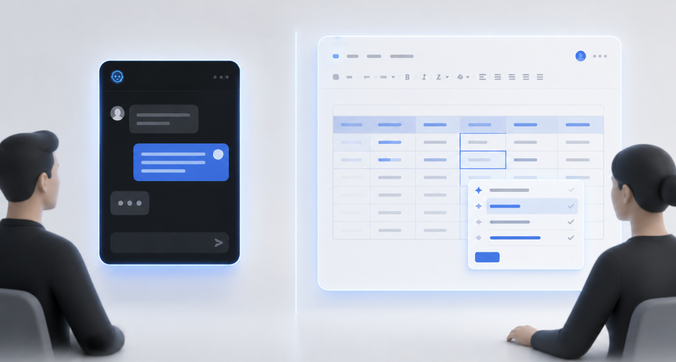
“Let’s add an AI chatbot” is often the default answer, but a chatbot is just one possible interface for AI – and frequently not the best one. Consider the alternatives:
- AI embedded directly inside existing workflows
- Smart search
- Contextual recommendations
- AI-assisted forms
- Automated summaries
- Workflow automation
- Embedded AI actions
- Intelligent, in-context suggestions
The underlying UX principle: AI should appear where users need its capability, not force users into a separate AI destination. A support tool that quietly drafts a reply inside the existing ticket view is usually more useful than a standalone chatbot the agent has to switch to. A CRM that surfaces a next-best-action inline is more useful than a chat window asking “what would you like to do today?”
Decide How Much Autonomy the Product Can Handle

Once you know what AI should do, the next question is how much room it should have to do it. Autonomy sits on its own spectrum:
Suggest → Assist → Preview → Confirm → Execute → Monitor
Where a given feature should sit depends on:
- Risk
- Reversibility
- User intent
- AI confidence
- Consequence
- Sensitivity
- Frequency
Low-risk, predictable, and easily reversible tasks can support more automation. High-impact or irreversible actions need stronger human oversight, no matter how confident the model is. This is the core tension explored in UX for AI that acts autonomously – it’s the strongest resource if your product is heading toward AI that takes action rather than just offering suggestions.
Check Whether the Product Is Ready for AI

Before writing a line of code, it’s worth assessing readiness on two fronts.
Product readiness means asking:
- Is the workflow clearly understood?
- Is the underlying data reliable?
- Are user permissions clear?
- Are measurable outcomes available?
- Can the team monitor AI behavior after launch?
- Does the team actually have a defined use case?
UX readiness is just as important. AI cannot fix a broken workflow, poor information architecture, confusing navigation, weak usability, or inconsistent interactions – it tends to make them more visible instead. Adding AI to a broken workflow usually makes the workflow more complicated, not better. If there’s any doubt about the current state of the UX, a UX audit of the existing product is a reasonable place to start before layering AI on top of it.
Think About the Design System and Existing Product Experience

AI should feel like a natural extension of the product, not a feature that was dropped in from somewhere else. That means respecting existing UI patterns, components, navigation, interaction patterns, accessibility standards, feedback states, and error handling.
At the same time, AI introduces interface needs most design systems weren’t originally built for – things like AI status indicators, generated-content states, approval flows, progress indicators, ways to express uncertainty, action history, and recovery states when something goes wrong. When the interface starts adapting or generating itself dynamically, it’s worth understanding how Generative UI affects design systems before those patterns multiply across the product.
Validate the AI Feature Before Scaling It

Before committing significant engineering or design resources, validate the use case in the real world. That means evaluating user demand, usefulness, accuracy, usability, trust, adoption, workflow completion, failure cases, the amount of human oversight actually required, and cost.
A practical path looks like:
Prototype → Small workflow → Limited users → Controlled pilot → Measure → Improve → Scale
Skipping validation and launching a large AI system all at once creates unnecessary product and technical risk. Iterative design and real user feedback consistently beat the assumption that a technically impressive model will automatically create value on its own.
Define Success Before You Build
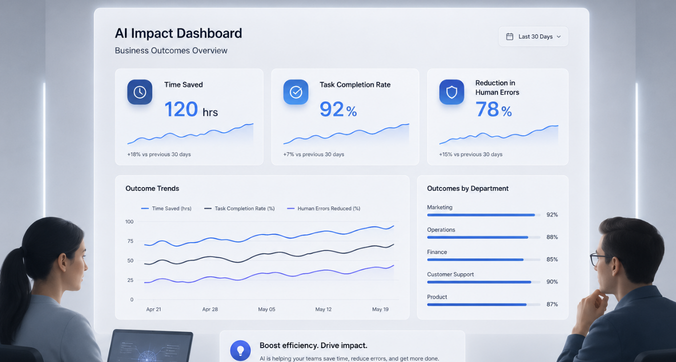
AI success shouldn’t be measured by the number of AI features shipped, how many prompts get sent, raw usage numbers, or how sophisticated the underlying model is. None of that tells you whether the feature actually helped anyone.
Instead, tie measurement to real product outcomes:
- Task completion
- Time saved
- Workflow completion rate
- User satisfaction
- Conversion
- Error reduction
- Retention
- Successful automation rate
- Human intervention rate
The right metric depends entirely on the specific use case – a summarization feature and an autonomous action feature shouldn’t be judged by the same yardstick.
A Practical AI Product Decision Framework
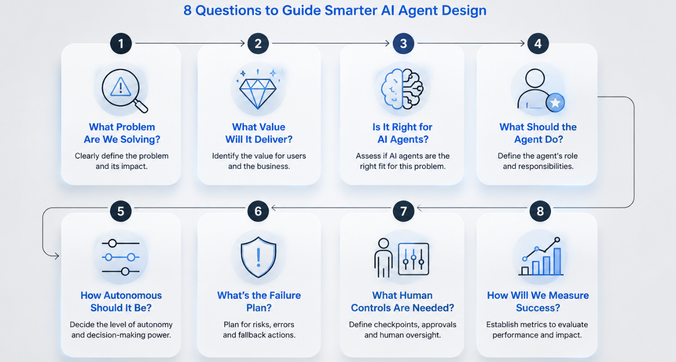
Before building an AI feature, run it through these eight questions:
- Identify the problem – What user problem are we solving?
- Establish the value – Why does solving it matter to users and the business?
- Evaluate AI – Is AI actually the best solution?
- Define the AI role – Should it recommend, assist, generate, automate, or act?
- Define autonomy – How much control should the user retain?
- Plan for failure – What happens when AI is wrong or uncertain?
- Define human controls – Where should users approve, edit, pause, undo, or intervene?
- Define success – Which measurable outcome will tell us whether this worked?
FAQs
Should every product add AI? No. AI should be introduced when it solves a meaningful user or business problem and delivers value that existing approaches can’t match as effectively.
What should a company do before adding AI to an existing product? Understand existing workflows, identify real user problems, evaluate UX quality, assess data and technical readiness, define the AI opportunity, and set clear success criteria.
Should AI be a chatbot or part of the existing product? It depends on the use case. In many cases, embedding AI inside an existing workflow creates a more useful experience than routing users to a separate chatbot.
How much control should users have over AI? It should depend on risk, reversibility, user intent, AI confidence, sensitivity, and the potential consequences of the AI acting incorrectly.
How do you measure whether an AI feature is successful? Measure outcomes that matter – task completion, time saved, adoption, satisfaction, error rates, workflow efficiency, and how often humans need to step in.
Conclusion
“We need AI” is not a product strategy – it’s a starting point. The teams that get real value from AI follow a consistent path: User Problem → Business Outcome → AI Opportunity → UX → Appropriate Autonomy → Validation → Measurement. Adding AI because competitors have it, or because leadership asked for it, isn’t a substitute for that process.
The products that succeed with AI are the ones that connect real capability to a real need, wrapped in a workflow that actually works and a product experience users can trust. UX and product design are what make that connection possible – they’re the bridge between what AI can do and what it’s actually worth to the customer.