
Enterprise apps improve user engagement and task efficiency through simplified workflows, intuitive navigation, and reduced cognitive load. By implementing role-based interfaces, prioritizing frequently used actions, and minimizing unnecessary steps, well-designed enterprise applications enable faster task completion, reduce errors, and improve overall user productivity across diverse organizational contexts.
Why UX Design is Critical for Enterprise App Engagement and Efficiency
Poor UX in enterprise applications directly impacts employee productivity, feature adoption, and operational costs, making interface quality a strategic business priority rather than an aesthetic consideration.
UX design is critical for enterprise apps because it:
- Reduces task friction by eliminating unnecessary steps, confusing navigation patterns, and redundant data entry that slow down daily workflows and frustrate users
- Improves employee productivity by making complex processes learnable and repeatable, allowing workers to focus on business outcomes rather than struggling with software interfaces
- Increases feature adoption by making valuable capabilities discoverable and accessible, ensuring that organizations realize returns on software investments
- Reduces training time through intuitive interfaces that align with user mental models, decreasing onboarding costs and accelerating time to competency for new employees
According to research from Forrester, a well-designed user interface can raise conversion rates by up to 200%, while better UX design can yield conversion rates up to 400%. In enterprise contexts, these improvements translate to measurable gains in transaction processing speed, data accuracy, and employee satisfaction.
When evaluating design capabilities, decision makers often examine how SaaS, fintech, and startup companies in India choose the right UI UX design agency, since this framework helps identify partners who understand both technical constraints and business outcomes in complex application environments.
Key UX Challenges in Enterprise Applications
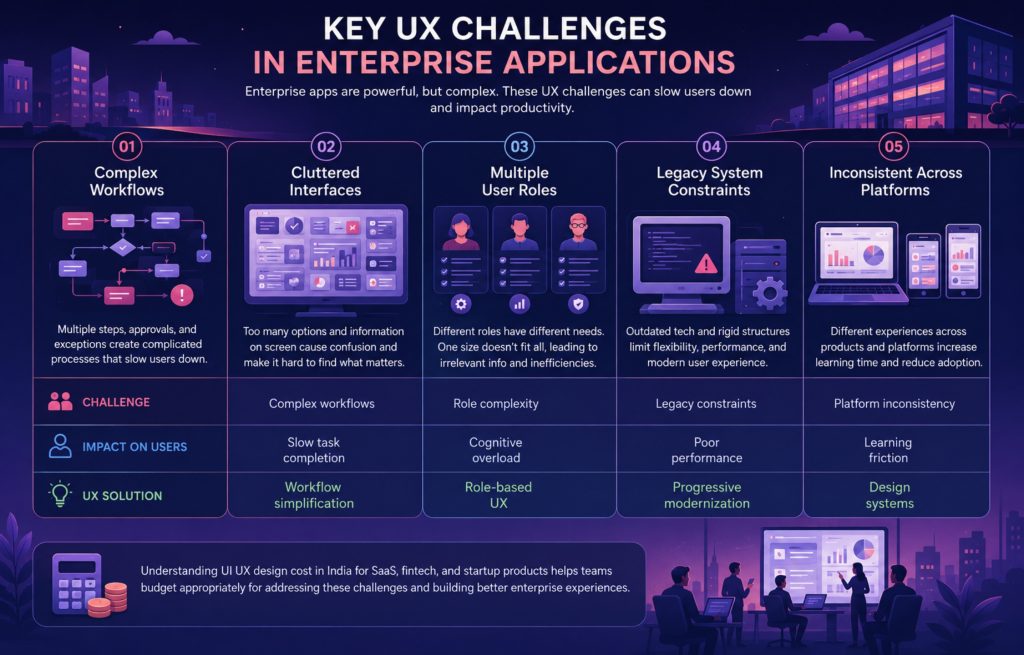
Enterprise applications face distinct design challenges that differentiate them from consumer products, requiring specialized approaches to balance functionality with usability.
The most significant UX challenges include:
- Complex workflows and processes involving multiple steps, conditional logic, approval chains, and exception handling that must accommodate real-world business complexity without overwhelming users
- Cluttered interfaces that attempt to expose every available function simultaneously, creating visual noise that makes it difficult to identify relevant actions or information
- Multiple user roles with different needs, ranging from data entry clerks to executives, each requiring different information density, functionality access, and workflow optimization
- Legacy system constraints, including outdated technology stacks, rigid data structures, and integration requirements that limit design flexibility and modern interaction patterns
- Lack of consistency across platforms when applications evolve through acquisitions, distributed development teams, or incremental feature additions without unified design governance
| Challenge | Impact on Users | UX Solution |
| Complex workflows | Slow task completion | Workflow simplification |
| Cluttered UI | Cognitive overload | Minimal interface design |
| Role complexity | Confusion | Role-based UX |
| Legacy constraints | Poor performance | Progressive modernization |
| Platform inconsistency | Learning friction | Design systems |
Understanding UI UX design cost in India for SaaS, fintech, and startup products helps teams budget appropriately for addressing these challenges, since enterprise application redesigns often require significant research, testing, and iterative refinement to balance diverse stakeholder needs.
How to Design Enterprise Apps for Better Engagement
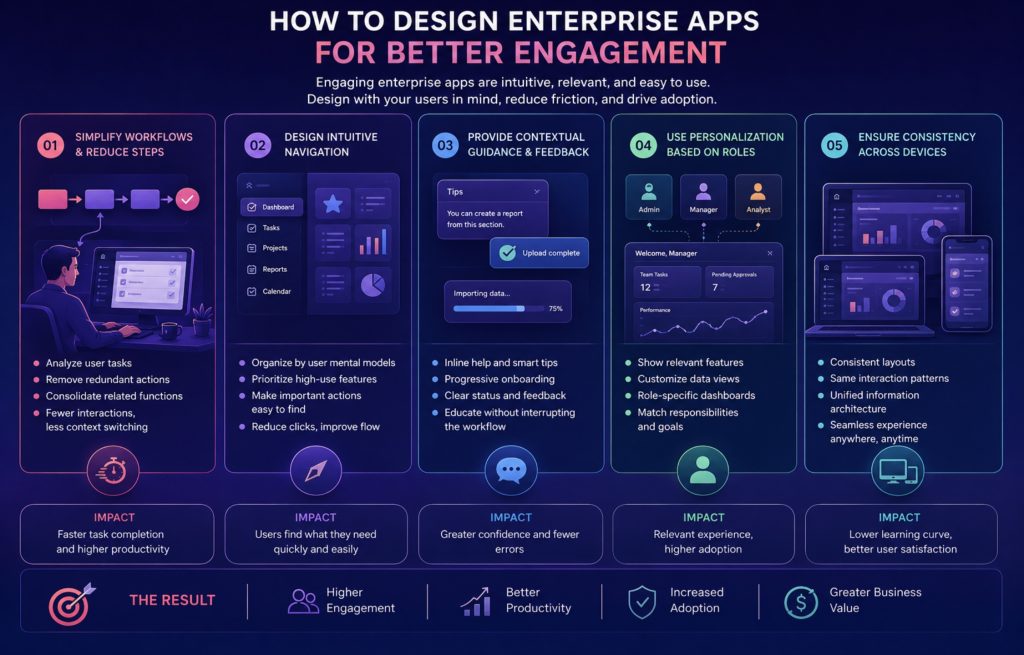
Improving engagement in enterprise applications requires understanding that most users interact with these tools out of necessity rather than choice, making ease of use and perceived value essential for sustained adoption.
Effective engagement strategies include:
- Simplify workflows and reduce steps by analyzing actual user task sequences, identifying redundant actions, and consolidating related functions so that common goals require fewer interactions and less context switching
- Design intuitive navigation systems that organize features according to user mental models and task frequency rather than technical architecture or departmental organization, placing high-use functions within immediate reach
- Provide contextual guidance and feedback through inline help, progressive onboarding, and clear system status indicators that educate users without interrupting workflows or requiring external documentation
- Use personalization based on user roles to display relevant features, appropriate data views, and customized dashboards that match individual responsibilities rather than presenting identical interfaces to all users
- Ensure consistency across devices by maintaining familiar layouts, interaction patterns, and information architecture whether users access the application via desktop, tablet, or mobile contexts
These approaches move beyond superficial design updates to fundamentally reconsider how applications support actual work. For example, simplifying workflows is not merely removing steps arbitrarily but understanding which actions create value and which exist only to accommodate system limitations or outdated processes.
Teams exploring how UX design improves conversion, retention, and product adoption in SaaS find that many principles translate directly to enterprise environments, particularly around reducing friction at critical workflow junctures and creating clear value perception.
How to Design Enterprise Apps for Task Efficiency
Task efficiency in enterprise applications directly affects operational costs and employee satisfaction, making it a measurable business outcome rather than a subjective quality metric.
Key efficiency design approaches include:
- Reduce time to complete tasks by analyzing workflow timing data, identifying bottlenecks, and implementing design patterns like autofill, smart defaults, bulk actions, and saved templates that eliminate repetitive manual work
- Prioritize frequently used actions through interface positioning, keyboard shortcuts, and quick-access menus that make routine operations immediately available without navigation or search
- Enable keyboard shortcuts and automation for power users who perform repetitive tasks, allowing them to bypass mouse-based interactions and create customized workflow accelerators
- Optimize performance and load times since perceived slowness creates task abandonment and frustration, particularly in data-heavy applications where users expect instant responses to queries and updates
- Minimize errors through validation using real-time input checking, clear formatting requirements, confirmation dialogs for irreversible actions, and contextual constraints that prevent invalid data entry
In real product environments, these improvements are measured and validated continuously. A customer relationship management system might reduce opportunity creation time from 8 minutes to 3 minutes by implementing smart field population based on account history. An inventory management application might cut order processing errors by 40% through improved validation and visual confirmation of quantities and destinations.
Organizations that study what a UI UX design agency in India actually does for SaaS and tech products discover that efficiency gains often come from systematic usability testing, workflow analysis, and iterative refinement based on actual usage patterns rather than assumptions.
Key UX Principles for Enterprise App Design
Successful enterprise applications follow specific design principles that address the unique cognitive demands and organizational contexts of workplace software.
Essential principles include:
- Progressive disclosure that reveals complexity gradually based on user expertise and task requirements, showing essential controls initially while making advanced features accessible through clear pathways for users who need them
- Clarity and hierarchy through typography, spacing, grouping, and visual weight that guide attention to important information and actions, reducing the time users spend interpreting interfaces
- Accessibility and inclusivity ensure that applications support diverse abilities through keyboard navigation, screen reader compatibility, sufficient contrast ratios, and interaction patterns that accommodate motor limitations
- Consistency in design systems using shared component libraries, standardized patterns, and unified visual languages that reduce learning curves when users encounter new features or modules
- Feedback and system visibility provide clear confirmation of actions, progress indicators for lengthy operations, and transparent error messages that explain what occurred and how to resolve issues
According to the Nielsen Norman Group, visibility of system status is among the most fundamental usability heuristics because users need to understand what the system is doing at all times. In enterprise applications where processes may involve backend systems, approval workflows, or batch operations, this principle becomes particularly critical for maintaining user confidence.
These principles provide the foundation for evaluating design decisions throughout development. When teams face tradeoffs between feature richness and interface simplicity, principles like progressive disclosure offer frameworks for making choices that serve both novice and expert users effectively.
How to Measure Engagement and Efficiency in Enterprise Apps
Measuring enterprise application success requires specific metrics that capture both usage patterns and productivity outcomes, going beyond basic analytics to understand business impact.
Critical measurement approaches include:
- Task completion rate tracking the percentage of users who successfully finish intended workflows without abandoning, requesting support, or finding workarounds, revealing where interfaces create insurmountable obstacles
- Time on task measures how long users take to complete specific actions compared to baseline expectations or competitive benchmarks, identifying opportunities for workflow optimization
- Feature adoption rate monitoring, which capabilities users actually engage with versus which remain undiscovered or avoided, indicating whether design successfully communicates value and usability
- Error rates capture how frequently users make mistakes in data entry, process execution, or navigation, since errors in enterprise contexts often create downstream costs through data cleanup, process delays, or compliance issues
- User satisfaction scores collected through System Usability Scale surveys, Net Promoter Score questionnaires, or contextual feedback mechanisms that gauge perceived ease of use and value
In real enterprise product evaluation, these metrics are analyzed together to create comprehensive usability profiles. An application might show high task completion rates but poor satisfaction scores, indicating that users can accomplish goals but find the experience unnecessarily difficult. Alternatively, strong satisfaction combined with low feature adoption might suggest that core workflows are solid but valuable advanced capabilities lack discoverability.
Product teams use these measurements to prioritize improvements, demonstrate ROI from UX investments to stakeholders, and validate design changes through controlled testing. For example, a procurement application might track how workflow simplification affects both time-to-purchase and buyer satisfaction, creating clear before-and-after comparisons that justify design resources.
Organizations can benchmark their measurement approaches against industry standards and best practices, which often become clearer when teams research comprehensive design processes and evaluation methodologies used by specialized agencies.
Conclusion
Designing enterprise apps that improve user engagement and task efficiency requires moving beyond aesthetic considerations to fundamentally understand how people work, what creates friction in their daily tasks, and how interfaces can actively support productivity rather than merely enable it. The combination of simplified workflows, intuitive navigation, role-based personalization, and performance optimization creates measurable improvements in both user satisfaction and business outcomes.
For SaaS founders, product managers, and digital transformation leaders, investing in enterprise app UX represents a strategic decision with quantifiable returns through reduced training costs, improved productivity, higher feature adoption, and decreased support burden. The key lies in applying principles like progressive disclosure, consistency, and accessibility systematically while measuring impact through task completion rates, time metrics, and error analysis.
As organizations continue modernizing their technology stacks and competing for talent in tight labor markets, the quality of internal tools becomes a differentiator in employee experience and operational efficiency. Understanding how to design enterprise apps that improve user engagement and task efficiency transforms software from a necessary cost center into a competitive advantage that directly impacts organizational performance and employee satisfaction.
Frequently Asked Questions (FAQs)
What is the biggest UX challenge in enterprise app design?
Balancing functionality with simplicity is the primary challenge because enterprise apps must support complex business processes while remaining learnable for diverse user skill levels. This requires careful information architecture, progressive disclosure, and role-based interface adaptation that prevents overwhelming users while maintaining necessary capabilities.
How does UX design reduce training time for enterprise applications?
Intuitive UX reduces training time by aligning interfaces with user mental models, providing contextual guidance, and maintaining consistency across features. When applications follow familiar patterns and clearly communicate functionality, users can transfer existing knowledge rather than memorizing arbitrary procedures, accelerating competency development.
What metrics best indicate enterprise app efficiency improvements?
Time on task and error rates provide the clearest efficiency indicators because they directly measure productivity gains. Reduced task completion times demonstrate workflow optimization, while lower error rates indicate improved clarity and validation. Together, these metrics translate to measurable cost savings and operational improvements.
How do role-based interfaces improve enterprise app engagement?
Role-based interfaces improve engagement by presenting relevant features and appropriate information density for each user type. This personalization reduces cognitive load, eliminates irrelevant distractions, and creates perceived value by showing users that the application understands their specific responsibilities and optimizes their particular workflows.
Should enterprise apps prioritize mobile or desktop experiences?
Priority depends on actual usage contexts identified through user research. Field workers and executives often require mobile optimization for access flexibility, while data-intensive roles like analysis or content creation benefit from desktop capabilities. The most effective approach is designed for the contexts where each user role actually performs tasks.