

Think about the last time you used an app or website that made you stop and think, “Where am I supposed to click?” Maybe an important button was difficult to find, the checkout process had too many steps, or the page took too long to load.
Now compare that with a product where everything feels straightforward. You know where to go, what to do next and whether your action was successful.
That difference comes down to User Experience (UX).
User Experience refers to how a person feels when interacting with a product, website, app or service. Good UX makes tasks easier, clearer and more accessible while helping businesses create products that people can actually use and want to return to.
What Is User Experience (UX)?

User Experience, commonly shortened to UX, is the overall experience a person has when using a product or service.
It covers more than how a product looks. UX considers whether people can understand the interface, find what they need, complete tasks easily and recover when something goes wrong.
For example, when using an online shopping website, UX includes everything from finding a product and comparing options to adding an item to the cart, making a payment and tracking the order.
What does User Experience include?
UX can include:
- Ease of use
- Navigation
- Accessibility
- Interaction
- User satisfaction
- Task completion
These factors work together. A visually attractive interface can still offer a poor experience if users cannot figure out how to use it.
Simple example of UX
Consider a food delivery app. If a user can quickly search for a restaurant, choose a dish, place an order and see its delivery status without confusion, the product is providing a smooth experience.
The UX extends across the entire journey, rather than one individual screen.
Why Is User Experience Important?

UX matters because people judge a product through their interactions with it. When those interactions are confusing or difficult, users may abandon the product even if it offers useful features.
1. Makes products easier to use
Good UX helps users understand what they can do and how to do it. Clear navigation, familiar patterns and well-structured information reduce the effort required to complete common tasks.
2. Reduces user friction
Every unnecessary click, unclear instruction or confusing form field can create friction. UX design identifies these obstacles and looks for ways to make important journeys more straightforward.
3. Improves customer satisfaction
When users can accomplish what they came to do without unnecessary frustration, they are more likely to have a positive impression of the product.
4. Supports better conversions
A complicated checkout, unclear call to action or lengthy sign-up process can cause users to leave before completing an action. Improving the experience can remove some of these barriers.
5. Improves product adoption and retention
A product may have powerful features, but those features have limited value if users cannot discover or understand them. An intuitive experience can make it easier for people to adopt a product and continue using it.
What Makes a Good User Experience?

A good user experience helps people complete their goals without making them work harder than necessary.
Some common characteristics include:
- Simple navigation: Users can find important information without searching through unnecessary layers.
- Fast task completion: Common actions require a reasonable number of steps.
- Consistent interface: Similar actions and components behave in predictable ways.
- Accessibility: People with different abilities can access and use the product.
- Useful feedback: The interface tells users what happened after an action.
- Fewer unnecessary steps: Forms, checkouts and other journeys avoid avoidable complexity.
- Mobile-friendly design: The experience works well across different screen sizes and devices.
Good UX is ultimately about making the product work well for the people using it.
UX vs UI: What’s the Difference?
UX and UI are closely connected, but they describe different areas of design.
| UX | UI |
| Focuses on the overall experience | Focuses on the visual interface |
| Deals with journeys and usability | Deals with colours, typography and components |
| Solves user problems | Presents the solution through the interface |
| Includes research and testing | Includes interface and interaction design |
A simple way to understand the difference is to think about a restaurant.
UX covers the broader experience: finding the restaurant, making a reservation, reading the menu, ordering food and paying the bill.
UI is more concerned with what the customer interacts with visually, such as the menu design, buttons, typography and layout.
In practice, UX and UI work together. A visually polished interface cannot compensate for a confusing journey, while a well-planned user journey still needs a clear interface to bring it to life.
What Are the Main Elements of UX?

UX involves several connected areas that help designers understand users and improve their interactions with a product.
1. User research
Research helps teams understand who their users are, what they need and where they encounter difficulties. It can involve interviews, surveys, usability studies and other research methods.
2. Information architecture
Information architecture focuses on how information is organised. A logical structure makes it easier for users to find content, features and actions.
3. Interaction design
Interaction design looks at how people interact with a product. This includes things such as buttons, forms, menus, navigation and system responses.
4. Usability
Usability asks a simple question: can users accomplish their goals effectively and easily?
5. Accessibility
Accessibility ensures that products can be used by people with different abilities and needs. It can influence everything from colour contrast and keyboard navigation to screen-reader support.
6. User journey
A user journey looks at the experience across multiple interactions rather than focusing on one screen. This helps teams identify problems that may appear between different stages of the experience.
What Is the UX Design Process?
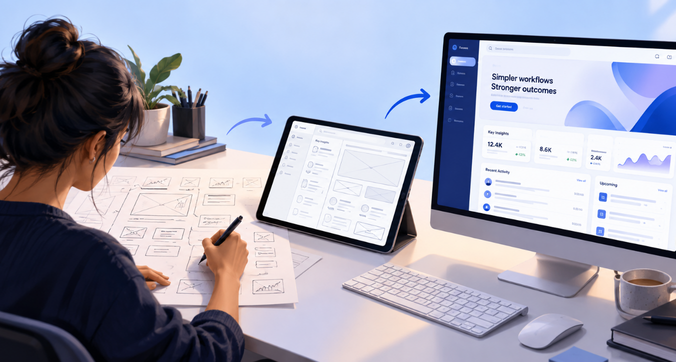
There is no single process that every UX team follows, but most UX projects involve research, design, testing and iteration.
Step 1 – Understand the user and business problem
The process starts by defining what needs to be solved. This includes understanding both user needs and the business goals behind the product.
Step 2 – Conduct user research
Designers gather information about users through methods such as interviews, surveys, usability testing and behavioural research.
Step 3 – Identify pain points
Research findings help teams identify where users struggle. These pain points can reveal problems with navigation, content, functionality or the overall journey.
Step 4 – Create user flows and wireframes
User flows map the steps people take to complete a task. Wireframes then provide a basic structure for screens and interactions.
Step 5 – Build a prototype
A prototype turns the proposed experience into something people can interact with before the final product is developed.
Step 6 – Test with users
Testing helps reveal whether users understand the proposed experience and where they continue to face difficulties.
Step 7 – Iterate and improve
UX is rarely finished after the first design. Teams use feedback and research findings to make changes and improve the experience over time.
Simple Real-World Example of Good UX

Example: Online banking app
Imagine an online banking app where transferring money requires navigating through several unrelated screens. The transfer option is difficult to find, important information is unclear and the confirmation message does not clearly say whether the transaction was successful.
That creates unnecessary uncertainty.
Now imagine an app where the transfer option is easy to find, the required details are grouped logically, the number of steps is kept reasonable and the user receives a clear confirmation after completing the transaction.
The underlying banking service may be similar, but the experience is very different.
This is what UX is designed to address: helping users complete important tasks with clarity and confidence.
How Does UX Impact Business Performance?

UX is closely connected to how people interact with a product, which can influence several business outcomes.
A smoother experience can help businesses:
- Increase conversions by removing friction from important journeys
- Improve product adoption by making features easier to understand
- Support retention by giving users a reason to continue using the product
- Reduce support queries when common problems are easier to resolve
- Reduce drop-offs during important tasks
- Build a stronger perception of the product or brand
The exact impact depends on the product, audience and business model. UX should therefore be connected to measurable user and business goals rather than treated as a purely visual exercise.
How Do You Know Your Product Has a UX Problem?

UX problems are not always obvious from the interface itself. User behaviour and feedback can reveal where the experience is getting in the way.
Some signs include:
- Users cannot find important features
- High drop-off during key journeys
- Users need extensive training to complete basic tasks
- Repeated complaints about usability
- Low adoption of important features
- Confusing navigation
- A poor experience on mobile devices
For example, if users repeatedly contact support to ask how to complete the same task, the problem may be with the product experience rather than the users themselves.
Looking at analytics alongside user feedback and usability testing can help identify where the experience needs attention.
Common UX Mistakes to Avoid
Even well-intentioned design decisions can create usability problems. Some common mistakes include:
- Designing based on assumptions instead of user research
- Skipping research and testing
- Adding unnecessary steps to important journeys
- Prioritising visual appeal over usability
- Ignoring accessibility
- Treating UX as a one-time activity
UX needs to evolve as products, users and business requirements change.
How f1Studioz Approaches User Experience Design

At f1Studioz, UX design is approached as a process of understanding users, business goals and the context in which a product is used.
The process can include user research, journey mapping, prototyping and usability testing to identify problems before they become expensive to fix.
For enterprise and SaaS products in particular, UX often involves working through complex workflows, multiple user roles and large amounts of information. A research-led approach can help teams simplify these experiences while keeping business requirements in view.
The work does not end with a prototype. Testing, feedback and iteration help refine the experience as the product evolves.
Frequently Asked Questions
1. What is User Experience in simple words?
User Experience is how a person experiences and interacts with a product, website, app or service. It covers factors such as ease of use, navigation, accessibility, interactions and overall satisfaction.
2. Why is UX important?
UX helps people complete tasks more easily and understand how a product works. For businesses, better UX can support adoption, conversions, retention and customer satisfaction.
3. What is an example of UX?
An online banking app is one example. Finding the transfer option easily, entering the required details, reviewing the transaction and receiving a clear confirmation are all parts of the banking app’s UX.
4. What is the difference between UX and UI?
UX focuses on the broader experience, including usability, research and user journeys. UI focuses more specifically on the interface, including visual design, typography, colours and interface components.
5. What makes a good user experience?
Good UX is clear, usable, accessible and consistent. It helps users complete their goals without unnecessary steps or confusion.
6. What does a UX designer do?
A UX designer researches user needs, identifies problems, maps user journeys, designs interactions and tests solutions. They use these insights to improve how people interact with a product.
7. How is UX measured?
UX can be measured using methods such as usability testing, task completion rates, user satisfaction surveys, conversion data, drop-off rates, retention and support queries. The right metrics depend on the product and its goals.
8. Can good UX improve conversions?
It can. When UX removes unnecessary friction from journeys such as sign-up, checkout or lead generation, users may find it easier to complete the intended action. The actual impact depends on the product and other factors affecting conversion.
Final Thoughts
User Experience is about more than making a product look good. It is about understanding what users need and creating an experience that helps them accomplish their goals with less confusion and friction.
From research and information architecture to prototyping and testing, UX brings different parts of the product experience together.
For businesses looking to improve how people interact with their digital products, a research-led approach can provide a stronger foundation for better experiences.
Looking to improve your product experience? Explore F1 Studioz’s UI/UX design services to see how research, strategy and design can come together to create better digital experiences.