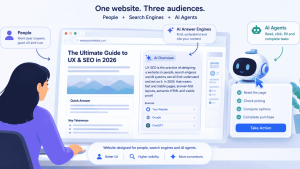
Quick answer: UX SEO is the practice of designing a website so people, search engines and AI systems can all find, understand and act on it. In 2026, that means fast and stable pages, answer-first layouts, server-rendered content, semantic and accessible HTML, and visible proof. These same UI/UX choices now decide whether you rank in Google, get cited in AI Overviews and ChatGPT, and convert the clicks that are left.
For years, UX and SEO sat in different meetings. Designers owned the experience. Marketers owned rankings. That split no longer works.
Search now answers questions before anyone visits a site. Google AI Overviews, AI Mode, ChatGPT search and Perplexity read your pages, pick passages and write the answer themselves. AI agents go further and try to complete tasks on your site. Every one of these systems depends on how your interface is built.
This guide explains what changed, how SEO, answer engine optimization (AEO) and generative engine optimization (GEO) differ, and the nine UI/UX priorities that matter most right now.
What changed: your website now has three audiences
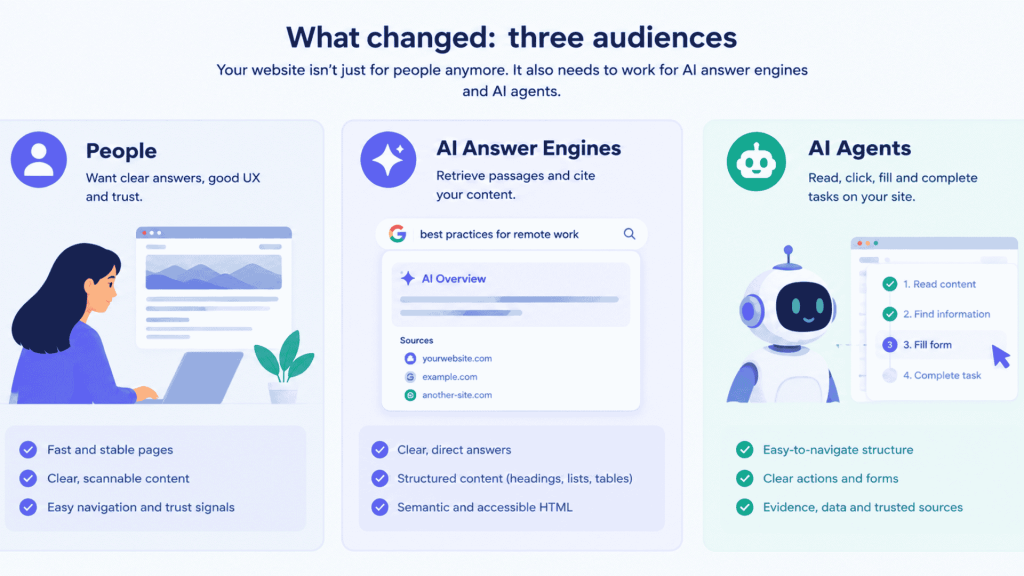
Your website used to have one main audience: people arriving from a list of blue links. Today it has three.
- People, who still judge speed, clarity and trust in seconds.
- AI answer engines, which retrieve passages from your page and cite them inside a generated answer.
- AI agents, which open your page, read its structure and try to click, fill and buy on a user’s behalf.
The scale is no longer small. Google says AI Overviews reach more than 2 billion people a month, and on its July 2026 earnings call Alphabet said AI Mode had passed 1 billion monthly active users.
Clicks are shrinking at the same time. In a Pew Research Center study of March 2025 browsing data, people clicked a regular search result on 8% of visits when an AI summary appeared, against 15% when none did. They clicked a link inside the summary on just 1% of visits.
SparkToro’s zero-click research tells a similar story. Its 2024 study found 58.5% of US Google searches ended without a click. Its 2026 study, which used a different data panel, put the figure near 68% for early 2026.
This is a zero-click search world. A zero-click search is a query that ends on the results page, because the answer was already shown there. Your design now has to win in two places: inside the answer, and on the page for the people who still click.
SEO vs AEO vs GEO: what each one needs from your UX
SEO, AEO and GEO are three views of the same goal: being the source search trusts. Google’s own May 2026 guide on generative AI features says optimizing for AI search is optimizing for the search experience, and “thus still SEO”. The labels still help teams decide what to build.
- Search engine optimization (SEO) earns rankings in traditional results.
- Answer engine optimization (AEO) earns the direct answer: featured snippets, People Also Ask, voice answers and the short answer at the top of AI Overviews.
- Generative engine optimization (GEO) earns citations and brand mentions inside generated answers from ChatGPT, Gemini, Perplexity and Google AI Mode.
| SEO | AEO | GEO | |
| Goal | Rank in the results list | Be the direct answer | Be cited in AI-written answers |
| Where it shows | Blue links, rich results | Featured snippets, People Also Ask, AI Overview answer | AI Overviews sources, AI Mode, ChatGPT, Perplexity, Gemini |
| What the UX must do | Load fast, stay stable, be crawlable, link pages logically | Put a clear answer under each question heading | Show evidence: data, sources, named experts, original insight |
| Typical UI elements | Heading hierarchy, breadcrumbs, internal links | Question H2s, summary boxes, tables, numbered steps | Data tables, quote blocks, author bios, cited sources |
| What to measure | Impressions, clicks, average position in Google Search Console | Snippet and AI Overview appearances | Citations and brand mentions in AI answers, AI referral traffic |
Some teams add AIO (AI optimization) as a fourth label. In practice, SEO vs AEO vs GEO vs AIO describes the same shift: content and interfaces that machines can read and trust.
The 9 UI/UX priorities that now decide search visibility
1. Design answer-first page layouts
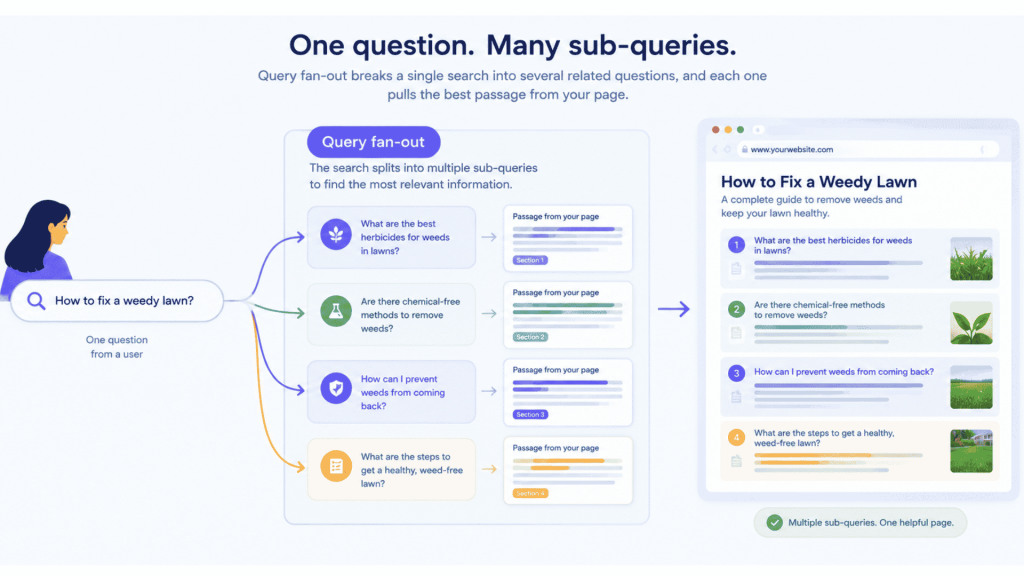
AI search breaks one question into many smaller ones. Google calls this query fan-out: a question about fixing a weedy lawn might also search for herbicides, chemical-free methods and prevention. Each sub-query pulls back the passage that answers it best.
A page wins that retrieval when every section answers one clear question, right away.
- Start the page with a 40–60 word summary that answers the main question.
- Write headings as the questions people actually ask.
- Put the direct answer in the first sentence under each heading, then add detail.
- Use tables for comparisons and numbered lists for steps.
This is classic inverted-pyramid writing, turned into a layout rule. It also helps human readers, who scan before they read.
2. Build a clear information architecture
Search engines and AI systems understand a site the same way a new visitor does: through its structure.
- One H1 per page, with H2s and H3s in a logical order.
- Breadcrumbs that show where the page sits.
- Topic clusters, where a pillar page links to every related article and each article links back.
- Descriptive link text such as “UX audit checklist” instead of “click here”.
Good information architecture helps Google judge topical authority. It also helps AI systems connect your pages into one trustworthy body of knowledge.
Read more About SaaS UI/UX design guide
3. Treat Core Web Vitals as design decisions
Core Web Vitals are Google’s three real-user measures of page experience. Google’s AI search guidance lists page experience as a success factor for both classic and AI results, so these numbers now matter twice.
| Metric | What it measures | Good | Poor |
| Largest Contentful Paint (LCP) | Loading of the main content | 2.5 s or less | Over 4.0 s |
| Interaction to Next Paint (INP) | Response to taps, clicks and key presses | 200 ms or less | Over 500 ms |
| Cumulative Layout Shift (CLS) | Visual stability | 0.1 or less | Over 0.25 |
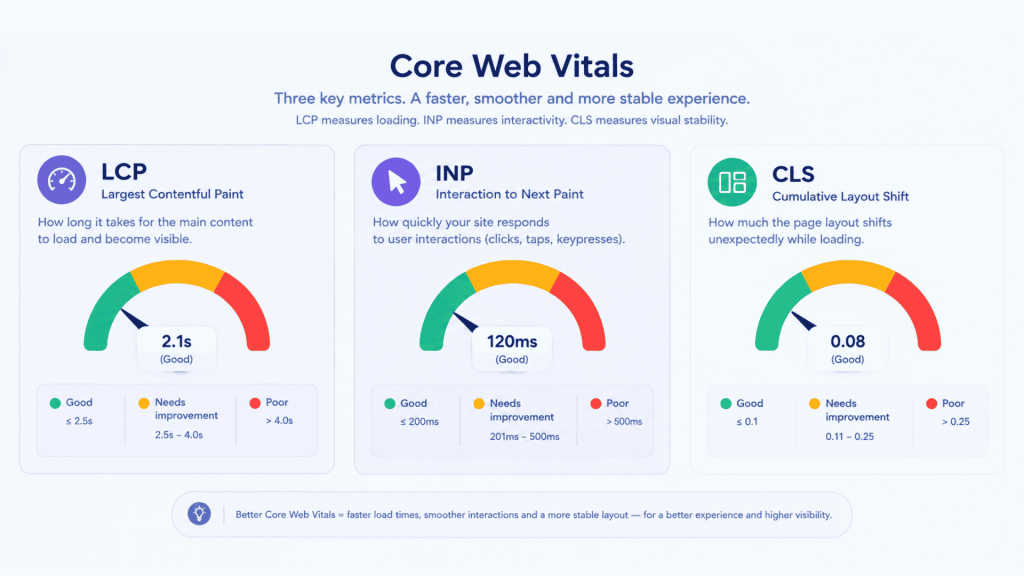
INP replaced First Input Delay as a Core Web Vital in March 2024. Each metric is judged at the 75th percentile of real visits.
Most failures start in design, not code:
- LCP suffers from oversized hero images, auto-playing hero videos and web fonts that block text.
- INP suffers from heavy animation libraries, chat widgets and mega-menus that run a lot of JavaScript on every tap.
- CLS suffers from cookie banners, ads and images without reserved space that push content down as the page loads.
Read more about mobile-friendly interface design
4. Server-render the content that matters
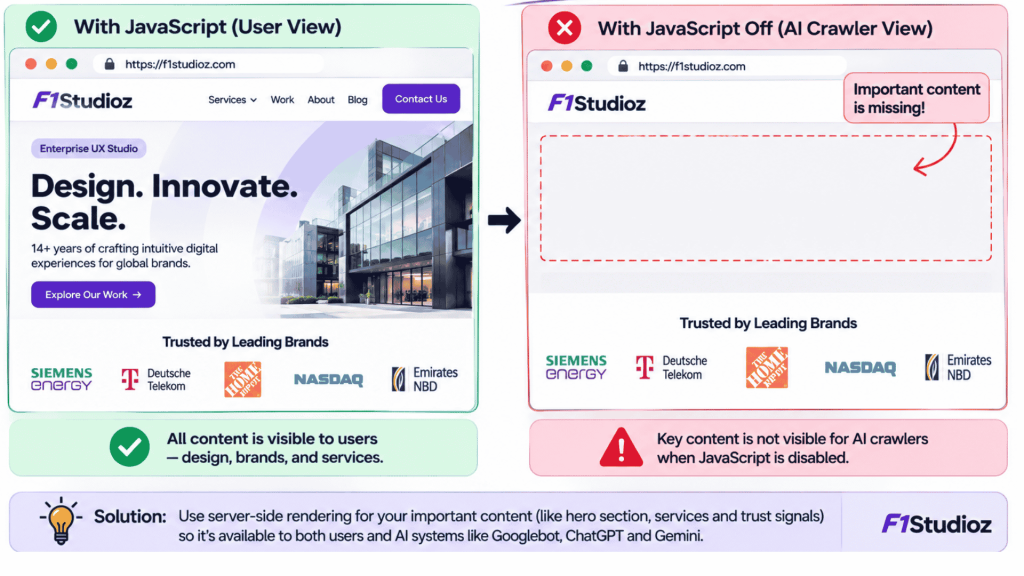
This is the most overlooked UX and SEO issue of 2026. Many AI crawlers do not run JavaScript.
A 2024 study by Vercel and MERJ tracked crawler traffic across Vercel’s network. OpenAI’s GPTBot made 569 million requests in a month and Anthropic’s ClaudeBot made 370 million, yet none of the major AI crawlers rendered JavaScript. Googlebot does render JavaScript, but in a later, slower pass.
If your pricing table, FAQ accordion, product specs or case-study tabs load only through client-side JavaScript, many AI systems see an empty shell.
- Render key text on the server, or generate static pages.
- Keep tabs and accordions, but make sure their text is in the initial HTML.
- Test by turning JavaScript off in your browser. What disappears is what many AI crawlers miss.
5. Use semantic HTML and an accessible interface
Accessibility used to be framed as compliance. It is now also a visibility requirement.
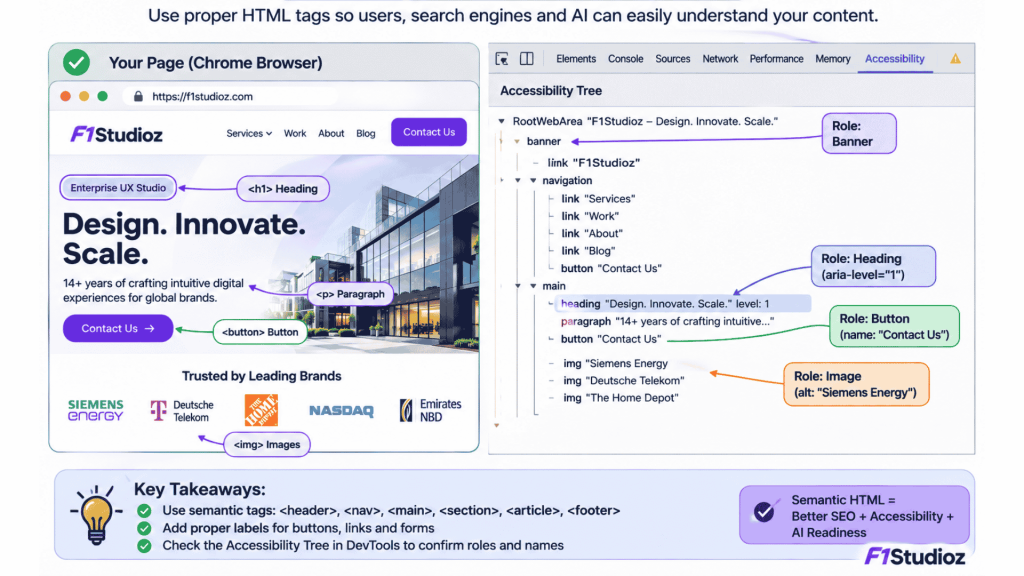
Google’s web.dev guide on agent-friendly websites explains that AI agents read a page in three ways: screenshots, raw HTML and the accessibility tree. The accessibility tree is the browser’s summary of every element’s role, name and state. It is the same map screen readers use.
- Use real <button> and <a> elements, not clickable <div>s.
- Connect every form label to its input with the for attribute.
- Add meaningful alt text to images and accessible names to icon-only buttons.
- Follow WCAG contrast and keyboard-navigation rules.
OpenAI’s own publisher FAQ says ChatGPT Atlas uses ARIA roles and labels to understand page structure. Treat ARIA as a fallback, though. Native HTML elements give agents and assistive tech the clearest signal.
6. Design for AI agents, not just visitors
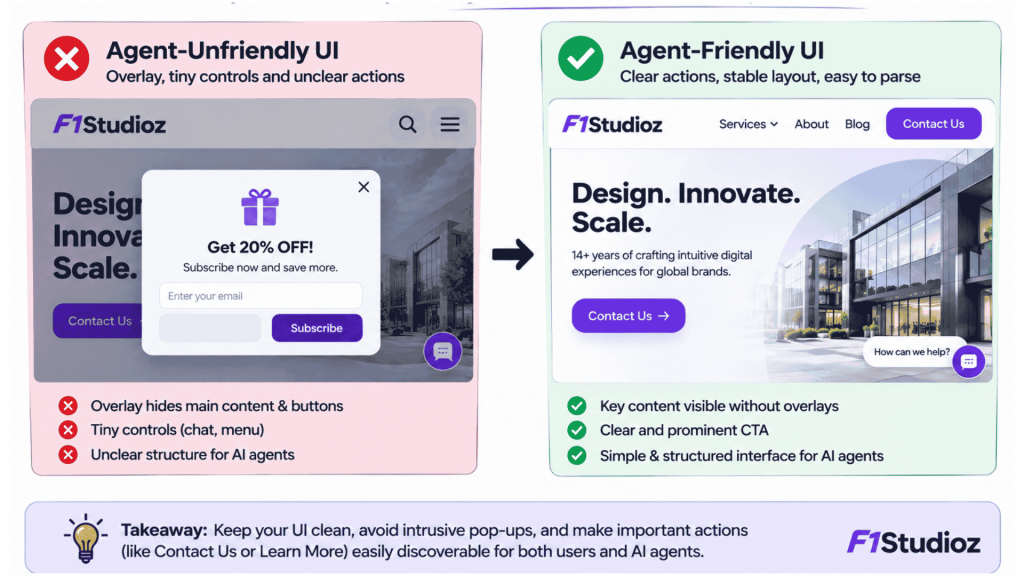
AI agents now try to finish tasks on websites: compare products, book appointments, fill forms. Interfaces built for visual delight often break them.
web.dev, updated in April 2026, recommends:
- No ghost elements. Transparent overlays can hide buttons from an agent’s visual analysis.
- Stable layouts. If the “Add to cart” button moves between product categories, agents get confused.
- Visible, sizeable controls. Interactive elements should be clearly visible and larger than 8 square pixels.
- Clear visual cues. A pointer cursor on clickable elements signals that they are actionable.
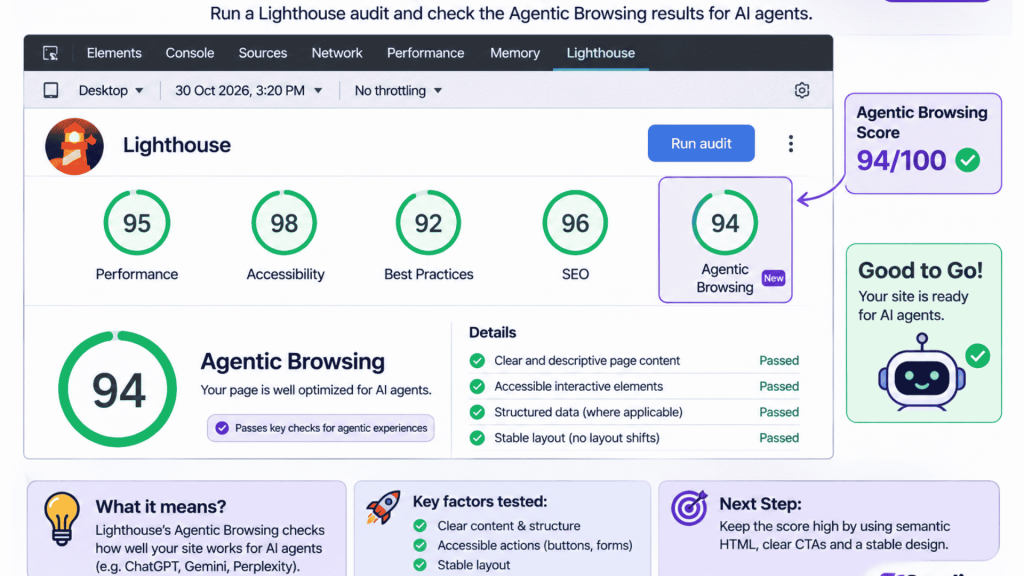
Google’s Lighthouse added an experimental Agentic Browsing category in version 13.3 on 7 May 2026. It checks agent-relevant accessibility, layout stability, llms.txt and WebMCP, a proposed standard that lets sites describe actions agents can take. It does not affect rankings today, but it shows where the web is heading.
7. Make proof visible on the page
Generative engines prefer sources they can quote with confidence. The original GEO research paper (Aggarwal et al., presented at KDD 2024) tested this directly. Adding statistics, quotations from credible sources and citations raised a page’s visibility in generated answers by up to 40%. Keyword stuffing did not help.
Google’s May 2026 guidance makes a similar point: focus on unique, non-commodity content that offers more than easily repeated information.
Design makes this proof easy to find and extract:
- Data tables and labelled charts, with the numbers also written in text.
- Pull quotes from named experts, with their role.
- A visible author bio with real experience.
- Inline source links and a short sources list.
- Original insight: your own data, project results and tested opinions.
Read More About user research in UI/UX design
8. Make visual content machine-readable
AI search is multimodal. Google’s guidance encourages high-quality images and video alongside text. Machines still need text to understand them.
- Never put key information only inside an image. Use real HTML tables, not screenshots of tables.
- Write descriptive file names, alt text and captions.
- Add transcripts and chapters to video.
- Keep infographics, but repeat their key numbers in the copy.
9. Design for the click that is left
Fewer people click. The ones who do usually arrive with stronger intent, because they have already read a summary. Your landing experience has to meet that intent fast.
- Match the page’s first screen to the question the visitor searched.
- Show the next step clearly: one primary CTA, written in plain words.
- Cut friction in forms, especially on mobile.
- Keep brand, logo and naming consistent, so people recognise you after seeing you cited in an AI answer.
In a zero-click world, brand recall becomes a design job. Someone who reads your name in an AI Overview today may search for you directly next month.
Read More About customer experience design
What you can skip: AI search myths
Google’s May 2026 AI optimization guide includes a mythbusting section. For Google’s AI features, it says you do not need:
- An llms.txt file or other special AI-only files or markup.
- To “chunk” content into tiny pieces for AI.
- To rewrite content just for AI systems.
- Special schema.org markup. Structured data is not required for AI features, though it still matters for rich results.
- Inauthentic brand mentions.
The guide also warns against making a separate thin page for every fan-out query variation, which can break its scaled content abuse policy.
One nuance: Google speaks for Google. Other AI assistants work differently, and Lighthouse’s experimental agent audit does check for llms.txt. Treat these extras as optional, low-cost hygiene, never as a shortcut.
Why poor UX now costs you twice
The importance of UX design has always shown up in conversions. Poor UX now also removes you from the answer before a visitor ever arrives. The ROI of UX design has a new line item: search visibility.
| UX problem | Search impact | Business impact |
| Slow hero image or heavy scripts | Fails Core Web Vitals, weaker page experience | Higher bounce, lower conversion |
| Content loaded only by JavaScript | Invisible to many AI crawlers | Lost AI citations and referrals |
| Vague headings, no direct answers | Missed snippets and AI Overview passages | Less visibility for buying questions |
| Clickable divs, unlabeled forms | Agents and screen readers fail | Lost leads, accessibility risk |
| Shifting layouts, pop-up overlays | Poor CLS, agents misclick | Frustrated users, abandoned tasks |
| No authors, data or sources | Low trust for AI and E-E-A-T | Weaker brand credibility |
Read More About when a product redesign makes sense
A 30-day UX SEO checklist for AI search
These UX SEO best practices work for SEO, AEO and GEO at the same time.
- Week 1: Measure. Check Core Web Vitals in Google Search Console and PageSpeed Insights. Note your top 20 pages by impressions.
- Week 1: Test rendering. Turn JavaScript off and reload those pages. List anything important that vanishes.
- Week 2: Fix structure. Rewrite headings as questions, add a summary at the top and put the answer first under each H2.
- Week 2: Fix semantics. Open the accessibility tree in Chrome DevTools. Replace clickable divs, label every form field and add alt text.
- Week 3: Fix speed and stability. Compress hero media, reserve space for images and banners, and defer non-essential scripts.
- Week 3: Add proof. Add author bios, original data, expert quotes and source links to key pages.
- Week 4: Check agents. Run Lighthouse with the Agentic Browsing category. Fix overlays, unstable layouts and tiny controls.
- Week 4: Track. In Search Console, compare impressions, clicks and average position against week 1. Watch AI referral traffic in analytics.
Read More About UI/UX tools and technologies
How f1Studioz approaches UX for SEO, AEO and GEO
At f1Studioz, we treat search visibility as part of the product experience, not something added after launch. Our design teams in Mumbai and Bangalore work with enterprise, SaaS and startup product teams on interfaces that serve people, search engines and AI agents together.
A typical engagement starts with a UX audit that combines analytics, usability findings, Core Web Vitals data and an AI-readiness review of rendering, semantics and content structure. Every finding is ranked by business impact, so teams fix what moves conversions and visibility first.
If your traffic is flat while AI search grows, the cause is often in the interface.
Book a UX audit for AI searchFrequently asked questions
What is UX SEO?
UX SEO combines user experience design with search engine optimization. It shapes page speed, layout, structure, accessibility and content so people can use a site easily and search engines and AI systems can understand, rank and cite it.
How does UX affect SEO rankings?
UX affects SEO through page experience signals such as Core Web Vitals, mobile usability and clear content structure. Pages that load fast, stay stable and answer the query quickly are easier for Google to rank and for AI systems to quote.
What is the difference between AEO and GEO?
AEO (answer engine optimization) aims to make your content the direct answer in featured snippets, People Also Ask and voice results. GEO (generative engine optimization) aims to get your brand cited inside AI-written answers from ChatGPT, Gemini, Perplexity and Google AI Mode.
What is generative engine optimization?
Generative engine optimization (GEO) is the practice of making content more likely to be used and cited by generative AI search. The term comes from a 2023 research paper that found citations, statistics and quotations raised visibility in AI answers by up to 40%.
Do Core Web Vitals affect AI Overviews?
Google’s guidance lists good page experience as a success factor for its AI search features, and AI Overviews draw on pages from Google’s index. Strong Core Web Vitals do not guarantee a citation, but poor page experience weakens a page in both classic and AI results.
What is a zero-click search?
A zero-click search ends on the results page without a click to any website, because the answer is shown there. SparkToro found 58.5% of US Google searches were zero-click in 2024, and AI Overviews are pushing that share higher.
Do I need llms.txt or special schema for AI search?
For Google, no. Its May 2026 guide says AI features need no llms.txt file and no special schema. Standard structured data still helps rich results, and some other AI tools may read llms.txt, so treat it as optional.
How do AI agents read a website?
AI agents read a website through screenshots, raw HTML and the browser’s accessibility tree. Semantic HTML, labelled forms, stable layouts and clearly visible buttons help agents understand a page and complete tasks such as booking or buying.


Sources
- Google Search Central: A new resource for optimizing for generative AI in Google Search (May 2026)
- Search Engine Journal: Google’s new AI search guide calls AEO and GEO “still SEO”
- Google Search Central: Top ways to ensure your content performs well in Google’s AI experiences
- web.dev: Build agent-friendly websites
- Pew Research Center: Google users are less likely to click on links when an AI summary appears
- Search Engine Land: Nearly 60% of Google searches end without a click in 2024
- GeoToolbox: Zero-click searches, SparkToro 2024 and 2026 figures
- Alphabet Q2 2026 earnings call transcript
- Vercel: The rise of the AI crawler
- Aggarwal et al.: GEO: Generative Engine Optimization (arXiv)
- OpenAI: Publishers and Developers FAQ
- Semrush: Google adds Agentic Browsing category to Lighthouse
- Agile Brand Guide: Core Web Vitals thresholds